 February 11, 2026
 11 min read
Convert JPG to Excel is now a core operational requirement for any business that handles identity documents at scale. Whether you run a bank, a clinic, or an HR department, the moment your team starts manually typing names and ID numbers from scanned cards is the moment you start losing productivity and exposing your organization to preventable errors.
AEO Direct-Answer Block
To convert JPG to Excel for ID card data, upload the image to an OCR-powered platform that automatically detects and extracts structured fields, including full name, ID number, date of birth, and permanent address, and maps them to labeled columns in an editable .xlsx or .csv file. The process takes under 10 seconds per document and requires zero manual input.
This guide covers how JPG to Excel OCR technology works, which fields it extracts, how to use the platform step by step, and what to look for in a secure, accurate solution for Vietnamese identity documents such as CMND and CCCD cards.
What Is JPG to Excel OCR, and Why Do ID Cards Need a Specialized Engine?
OCR, or Optical Character Recognition, is a technology that analyzes pixel patterns in a scanned image and converts them into machine-readable, editable text. When applied to identity documents, OCR enables organizations to extract structured data fields, such as full name, ID number, and date of birth, directly from a scanned JPG file and output the results into a structured spreadsheet.
Standard image-to-spreadsheet converters struggle with identity documents for three specific reasons. First, ID cards contain layered security features: guilloche backgrounds, holograms, and embedded watermarks that introduce noise. Second, the character spacing on official identity cards follows government-mandated typographical standards that generic OCR models have never been trained on. Third, Vietnamese ID cards, both the 9-digit CMND and the newer chip-based CCCD, require accurate recognition of 29 diacritic characters that most global OCR tools routinely corrupt.
A specialized JPG to Excel OCR engine, trained specifically on Vietnamese government-issued documents, eliminates all three failure modes. This is the foundational difference between a generic converter and a purpose-built solution.
For financial documents that require the same level of structured extraction, see our guide to converting JPG invoices to Excel.
The Real Cost of Manual ID Data Entry
Time and Labor Overhead
Manual data entry for identity documents is expensive at any scale. At an average typing speed, a skilled clerk takes 3 to 5 minutes to transcribe the data from a single ID card. For an organization processing 500 cards per day, that represents 25 to 42 staff-hours consumed by a task that OCR data extraction from ID cards can complete in under 90 minutes, fully automated.
According to research on intelligent automation, organizations that digitize document-heavy workflows reduce processing costs by up to 80 percent, with manual document handling consistently identified as the primary bottleneck across banking, healthcare, and logistics.
Compliance and Error Risk
A single mistyped digit in a national ID number can derail a loan application, fail a KYC submission, or trigger a regulatory audit. Under Vietnam’s Circular 16/2020/TT-NHNN governing e-KYC for financial institutions, identity data must be recorded accurately and verified against official documentation. Manual processes carry an error rate of 1 to 4 percent per field, which is unacceptable in any compliance-sensitive workflow.
How the OCR Engine Converts ID Card JPG to Excel
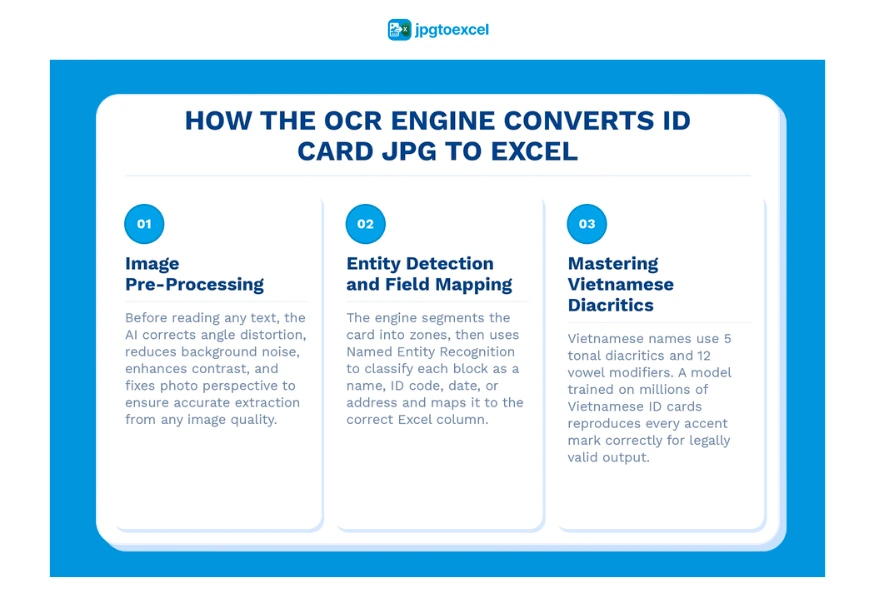
Image Pre-Processing
Before the AI reads a single character, it applies a pre-processing pipeline to clean the source image. This includes noise reduction to remove grain and background patterns, deskewing to correct angle distortion from hand-held photography, contrast enhancement to sharpen faint ink, and perspective correction for cards captured at an angle.
This pre-processing stage is what allows jpgtoexcelconverter to extract accurate data even from imperfect source images, such as a smartphone photo taken under standard office lighting.
Entity Detection and Field Mapping
After pre-processing, the engine segments the image into logical zones: the portrait area, the machine-readable zone (MRZ), and the individual data fields. Named entity recognition (NER) classifies each text segment, determining which string is a legal name, which is an ID code, and which is a date or address. The classified entities are then mapped to predefined columns in the Excel output file.
Mastering Vietnamese Diacritics in ID Card OCR
Vietnamese is written with a Latin-based alphabet that uses five tonal diacritics and twelve vowel modifiers. A name like “Nguyen Thi Phuong Anh” with all correct accent marks contains multiple combined characters that must be reproduced exactly for the record to be legally valid. Global OCR tools, trained predominantly on English and Western European text, regularly strip or misread these marks.
jpgtoexcelconverter was trained on millions of Vietnamese government-issued documents, achieving character-level accuracy across the complete Vietnamese Unicode character set.
Key Data Fields Extracted When You Convert ID Card Images to Excel
AEO Direct-Answer Block
When converting a Vietnamese ID card JPG to Excel, the OCR engine extracts seven core fields: full legal name, ID number (9 or 12 digits), date of birth, permanent address, gender, place of origin, and expiry date. Each field is mapped to a labeled column in the output spreadsheet, making the data immediately ready for database import or system integration.
| Field | Data Type | Excel Column |
| Full Name | Text string | Column A |
| ID Number | 9 or 12-digit code | Column B |
| Date of Birth | DD/MM/YYYY | Column C |
| Permanent Address | Long text string | Column D |
| Gender | M / F | Column E |
| Place of Origin | Province name | Column F |
| Expiry Date | DD/MM/YYYY | Column G |
For chip-based CCCD cards, the engine can also read NFC-embedded certificate data when paired with a compatible reader, extending the output with biometric verification codes.
Once these fields are structured in Excel, the data can be used to auto-populate payroll systems, CRM databases, loan application forms, or patient registration records without a single additional keystroke.
HR and payroll teams can connect extracted ID data directly to salary processing workflows. See our full guide to payroll document OCR.
How to Convert JPG to Excel with jpgtoexcelconverter: Step by Step
This four-step workflow applies equally to single documents and enterprise-scale batch uploads.
Step 1: Capture or Scan the ID Card
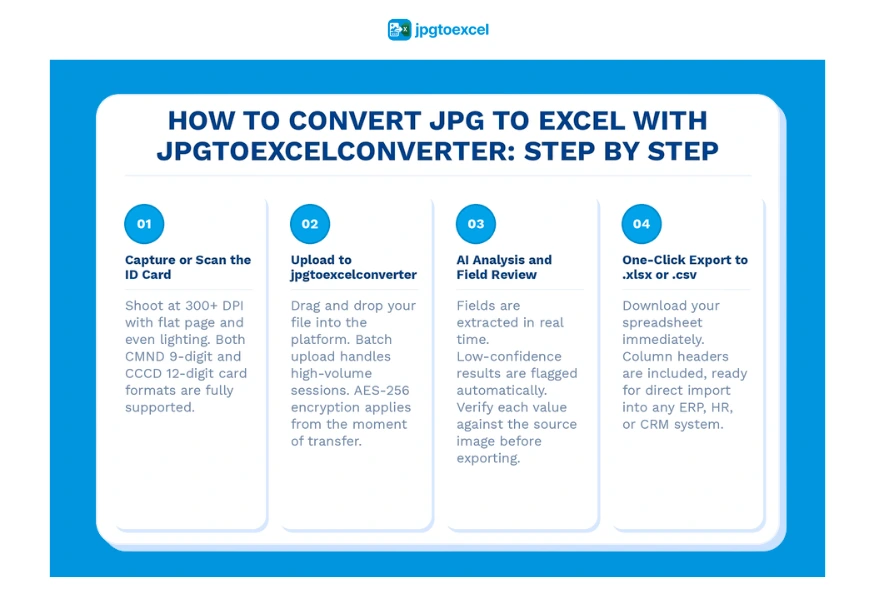
Use a smartphone camera or flatbed scanner to capture both sides of the identity card. The image should be at a minimum of 300 DPI for reliable extraction. Keep the card flat, avoid harsh shadows, and ensure all text fields are within the frame. Both CMND 9-digit and CCCD 12-digit formats are fully supported.
Step 2: Upload to jpgtoexcelconverter
Drag and drop your JPG, PNG, or scanned PDF into the platform. Single files upload instantly. For volume processing, use the batch upload feature to queue hundreds of cards in one session. All files are encrypted with AES-256 from the moment they are transferred, before any processing begins.
Step 3: AI Analysis and Field Review
The OCR engine analyzes the image in real time. Extracted fields appear on screen within seconds, displayed alongside a preview of the original image so you can verify each value at a glance. Fields where the AI confidence score falls below a set threshold are flagged for human review, providing a built-in quality control layer without slowing the overall workflow.
Step 4: One-Click Export to .xlsx or .csv
Click Export to download your structured spreadsheet immediately. The output file includes labeled column headers, ready for direct import into any ERP, HR, or CRM system. For high-volume environments, the API routes export directly to a connected database without requiring manual download steps.
Manual Entry vs. OCR Automation: A Side-by-Side Comparison
| Factor | Manual Entry | OCR Automation (jpgtoexcelconverter) |
| Time per card | 3 to 5 minutes | Under 10 seconds |
| Error rate | 1 to 4% | Under 0.1% |
| Scalability | Headcount-bound | Unlimited |
| Cost per record | High (labor cost) | Near-zero marginal cost |
| Compliance audit trail | Inconsistent | Full processing log |
| Vietnamese diacritic accuracy | Variable | 99%+ (trained model) |
The business case for converting to automated ID card OCR to Excel is clear at any volume. Even for a team processing 50 cards per day, the time savings justify the switch within the first week.
See how the top image-to-spreadsheet converter tools compare across key performance factors in our best JPG to Excel converters guide.
Security and Compliance When You Convert Scanned Identity Images to Excel
Encryption and Data Handling Standards
Identity data is the highest-sensitivity category of information an organization can hold. jpgtoexcelconverter applies AES-256 encryption to every uploaded file in transit and at rest. Uploaded images are deleted from the system after processing is complete, meaning no copy of your customers’ or employees’ identity documents is retained on external servers beyond the active session.
Regulatory Compliance for PII
Two regulatory frameworks directly govern how organizations may process personal data extracted from ID cards.
GDPR Article 9 classifies government-issued identity documents as special category personal data, requiring an explicit legal basis for processing and strict controls on storage and access.
Within Vietnam, Decree 13/2023/ND-CP on Personal Data Protection (effective July 1, 2023) establishes requirements for consent, data minimization, and the rights of data subjects when organizations collect and process personal identification data. Any business using an image-to-spreadsheet converter on Vietnamese ID cards must operate within this framework.
Insurance and healthcare organizations with additional compliance obligations can review how the same OCR pipeline applies to their workflows in our insurance claims processing guide.
Which Industries Use ID Card JPG to Excel Conversion Most?
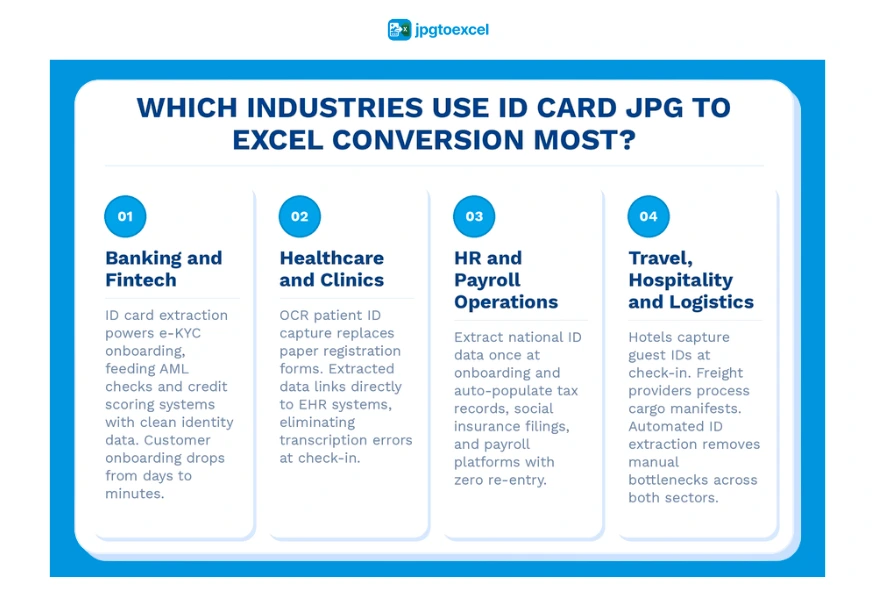
Banking and Fintech
Digital customer onboarding in banking starts with identity verification. Converting JPG to Excel for ID card data is the first step in any e-KYC workflow, feeding downstream AML checks and credit scoring systems with clean, structured identity records. The speed of extraction directly determines how fast a bank can onboard a new customer and begin the relationship.
Healthcare and Clinics
Hospitals and clinics collect patient identity data at registration. Replacing paper forms with OCR-based ID capture eliminates transcription errors in patient records and accelerates the check-in process during peak hours. See how the same logic applies to medical report OCR workflows.
HR and Payroll Operations
When onboarding new employees, HR teams collect national ID cards to populate tax records, social insurance filings, and payroll systems. OCR data extraction from ID cards at the point of onboarding eliminates duplicate data entry across multiple platforms and reduces onboarding time from hours to minutes.
Travel, Hospitality, and Logistics
Hotels and travel agencies capture guest identity at check-in. Freight and logistics providers process cargo manifests that reference shipper and consignee identity documents. In both cases, the ability to convert a scanned image to Excel at speed is a direct operational advantage. See how this extends to bill of lading automation.
Conclusion
Converting JPG to Excel for identity document processing is no longer a technical edge case. It is an operational baseline for any organization that handles CMND or CCCD data at scale. The organizations that automate ID card OCR today are the ones that onboard customers faster, maintain cleaner compliance records, and free their teams from low-value data entry work.
jpgtoexcelconverter delivers purpose-built OCR data extraction from ID cards with the diacritic accuracy, security architecture, and processing speed that the Vietnamese government documents require. Whether you are digitizing a single card or processing thousands per week, the path from JPG image to structured Excel data takes under 10 seconds.
FAQ: Converting ID Card JPG to Excel
How do I convert a JPG image to Excel?
Upload the JPG to an OCR-powered platform such as jpgtoexcelconverter.com. The engine scans the image, identifies structured data fields, and maps the extracted text to labeled columns in an .xlsx or .csv file. The entire process, from upload to downloadable spreadsheet, takes under 10 seconds per document and requires no manual input.
Can OCR software accurately extract data from ID cards?
Yes, provided the OCR engine is trained on government-issued identity documents. General-purpose tools perform poorly on ID cards due to security backgrounds and non-Latin scripts. A purpose-built ID card OCR to Excel solution trained on Vietnamese CMND and CCCD documents consistently achieves extraction accuracy above 99 percent for all standard data fields.
What is the best tool to convert scanned documents to Excel?
The best tool depends on your document type. For identity documents, you need a platform specifically trained on ID card formats, not a generic image converter. jpgtoexcelconverter is built for this exact use case, with dedicated models for Vietnamese ID cards, batch processing capability, AES-256 security, and direct .xlsx export.
How accurate is OCR for Vietnamese ID cards like CMND and CCCD?
With a Vietnam-trained OCR engine, accuracy for standard data fields exceeds 99 percent. The critical differentiator is diacritic accuracy: Vietnamese legal names contain tonal and vowel modifiers that generic tools misread. A purpose-built model handles the complete Vietnamese Unicode character set at the character level, producing legally valid output.
Is it safe to upload ID card images to an online converter?
It is safe when the platform uses AES-256 encryption in transit and at rest, applies a strict minimal-retention data policy with no long-term file storage, and operates in compliance with applicable data protection law, including GDPR and Decree 13/2023/ND-CP. jpgtoexcelconverter meets all three requirements and does not retain file copies after the session ends.
- Email: contact@jpgtoexcelconverter.com
- LinkedIn: https://www.linkedin.com/in/jpgtoexcelconverter/
- X: https://x.com/jtoexcelconvert