
 March 19, 2026
 11 min read
Insurance claim JPG to Excel conversion is the operational backbone of any modern claims department serious about eliminating manual bottlenecks and scaling without proportionally increasing headcount. Yet most insurance firms are still paying clerks to type data from smartphone photos of receipts, blurry garage estimates, and handwritten loss inventories, one document at a time.
The math does not work in their favor. According to McKinsey’s insurance automation research, processing a single claim manually costs between $15 and $30. With an automated OCR system, that figure drops to $3 to $6 per claim. For a mid-size insurer processing 10,000 claims per month, that gap represents up to $270,000 in avoidable operational cost, every single month.
This guide covers exactly how the conversion technology works, where it delivers the most value across insurance verticals, and what criteria actually matter when choosing a platform for your team.
Why JPG Files Are Breaking Your Claims Workflow
Every JPG submitted by a claimant is, from your system’s perspective, a dead end. It is a photograph of data, not data itself. Your claims management platform cannot search it, sort it, flag it for audit, or run fraud detection logic against it. The information is there, but it is locked.
This is the core problem that insurance claim JPG to Excel automation solves: converting unstructured visual content into structured, cell-based data your systems can actually use.
The Hidden Cost of Manual Data Entry in Insurance
Manual transcription in claims processing carries a well-documented error rate of 1 to 4%, according to AIIM (Association for Intelligent Information Management). On high-value claims, a single mistyped digit can trigger a legal dispute, generate a regulatory fine, or result in a five-figure overpayment.
Beyond accuracy, there is the cost of time. An experienced data entry operator takes 8 to 15 minutes to process a single multi-line claim document. At scale, this becomes a structural constraint on your entire operation, one that hiring more staff only temporarily relieves.
The downstream effects are equally damaging. Slow data entry delays the First Notice of Loss (FNOL) process. Delayed FNOL means delayed settlements. And delayed settlements are the single most cited driver of policyholder churn in the insurance sector.
How Static Image Files Create a Data Bottleneck
When a claimant photographs a pharmacy receipt on their phone and submits it as a JPG, the file contains everything an adjuster needs: date of service, provider name, drug codes, total billed, and insurance ID. But without convert insurance claim image to Excel technology, none of that information is machine-readable.
Your team cannot run a bulk audit across 500 JPG files. They cannot flag claims where the billed amount exceeds a threshold. They cannot cross-reference a provider name against a fraud watchlist. Every one of those actions requires the data to exist in a structured format first.
This is the bottleneck. And it compounds daily.
How Insurance Claim JPG to Excel Conversion Actually Works
Claim OCR (Optical Character Recognition) is the AI-powered technology that scans an image file, identifies text and numerical data within it, interprets the semantic context of that data, and exports it into a structured spreadsheet format. Modern claim OCR goes far beyond basic character recognition, using deep learning models trained specifically on insurance document layouts to achieve accuracy rates above 99% on standard documents.
Here is how the full pipeline works, step by step.
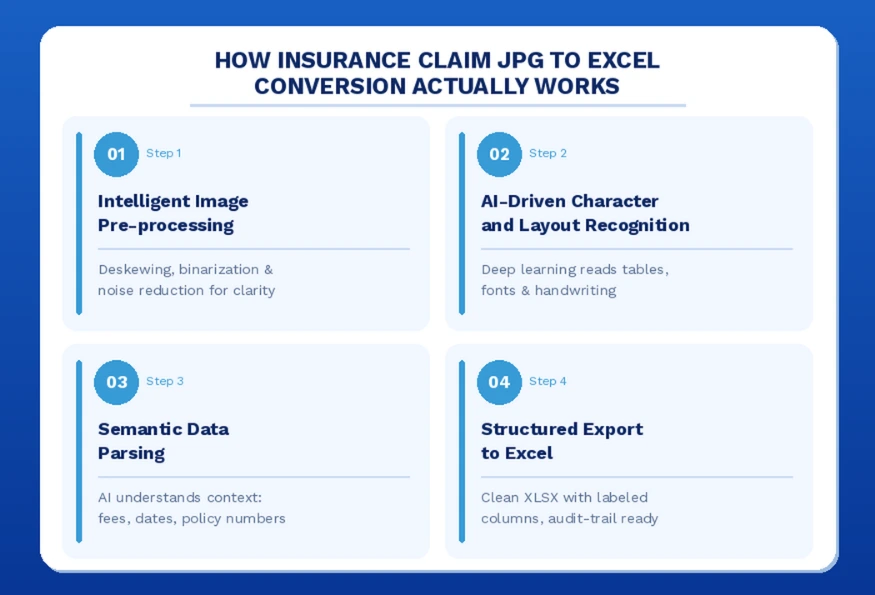
Step 1: Intelligent Image Pre-processing
Before any character recognition occurs, the system evaluates the quality of the submitted image. Claimants rarely submit perfect scans. Photos are taken at angles, in poor lighting, or on crumpled paper.
Pre-processing corrects for these variables automatically: deskewing rotated images, applying binarization to sharpen contrast between text and background, and reducing noise from low-resolution captures. This step is what separates a 95% accuracy system from a 99%+ accuracy system, and it is where most budget OCR tools cut corners.
Step 2: AI-Driven Character and Layout Recognition
Once the image is clean, the deep learning engine maps the document layout and begins character-level recognition. Unlike legacy OCR tools that work line by line, modern AI models read documents the way a human adjuster does: understanding tables as tables, totals as totals, and line items as line items.
This means the system can accurately process a multi-column pharmacy receipt, a handwritten garage estimate, or a printed hospital bill using the same underlying model, without requiring separate templates for each document type.
Step 3: Semantic Data Parsing
This is the intelligence layer that transforms raw character recognition into usable insurance data. When the system reads “100.00,” it does not just extract a number. It determines, based on position, surrounding labels, and document context, whether that figure is a service fee, a co-pay, a tax amount, or a total billed.
Named Entity Recognition (NER) identifies and tags specific fields: policy numbers, claimant names, dates of service, provider NPI codes, and diagnosis codes. This insurance document digitization capability is what makes the output immediately usable in downstream claims systems.
Step 4: Structured Export to Excel
The final output is a clean XLSX file with data mapped to labeled columns: Date of Service, Provider Name, Procedure Code, Amount Billed, and Claim ID. The file is formatted for direct import into standard claims management platforms, including Guidewire, Duck Creek, and Salesforce Financial Services Cloud.
Every extracted cell maintains a reference link to the original source image, creating an unbreakable audit trail for compliance and dispute resolution.
Manual vs. Automated Claims Processing: A Direct Comparison
The operational case for automation becomes definitive when the two approaches are placed side by side.
| Metric | Manual Processing | Automated OCR |
| Processing time per claim | 8 to 15 minutes | 30 to 60 seconds |
| Error rate | 1 to 4% | Below 0.5% |
| Cost per claim | $15 to $30 | $3 to $6 |
| Scalability during surge | Requires additional hires | Handles 10x volume instantly |
| Audit trail | Manual, fragmented | Automatic, source-linked |
| FNOL processing speed | Days | Hours |
The scalability row deserves particular attention. During a natural disaster or regional surge event, claim volumes can increase tenfold within 72 hours. A manual operation cannot respond to that spike without weeks of recruiting and onboarding. An automated insurance data entry automation system absorbs the load without any operational change.
Key Use Cases: Where Claim OCR Excel Delivers the Most Value
The versatility of insurance claim JPG to Excel technology means it applies across every major line of business, not just high-volume health claims.
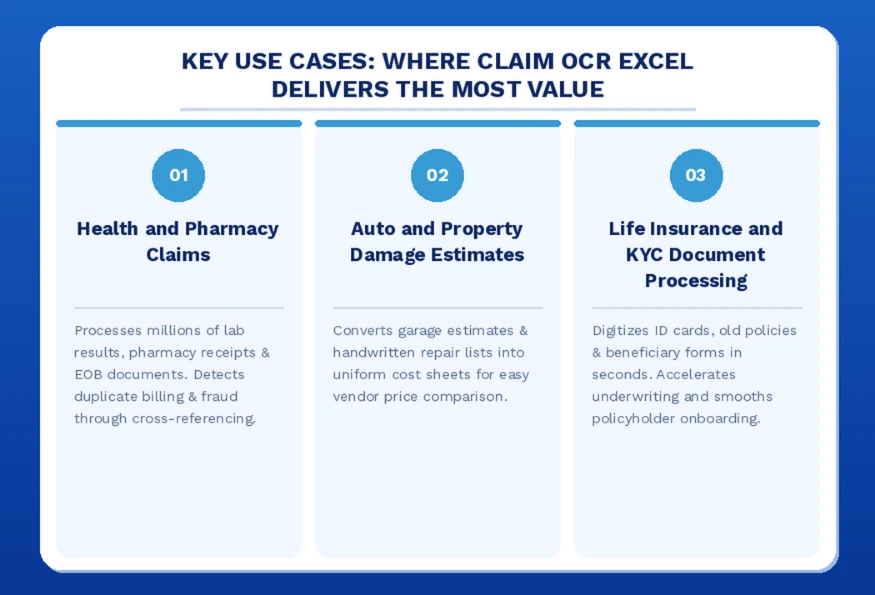
Health and Pharmacy Claims
Health insurers process millions of lab results, pharmacy receipts, and explanation-of-benefits (EOB) documents annually. Each document contains complex line items with drug codes, dosage quantities, consultation fees, and co-pay breakdowns.
A high-quality convert lab result JPG to Excel tool captures these details at the line-item level, enabling rapid medical necessity reviews, duplicate billing detection, and automated cross-referencing against formulary databases. Fraud detection accuracy improves significantly when the underlying data is structured and searchable rather than locked in image files.
Auto and Property Damage Estimates
Repair shops submit estimates in every format imaginable: printed forms, handwritten notes, and photographed whiteboards. An insurance claim JPG to Excel tool converts these inconsistent inputs into uniform cost sheets, making vendor price comparisons straightforward and defensible.
For property damage claims, policyholders often photograph handwritten lists of lost or damaged items. Automating this into a structured convert JPG invoice to Excel spreadsheet creates a clear inventory for reimbursement calculation, removing the adjuster’s need to manually transcribe each line.
Life Insurance and KYC Document Processing
Managing Know Your Customer (KYC) compliance requires rapid digitization of identity documents, historical policy files, and beneficiary designation forms. A robust claim OCR system verifies and extracts identity data in seconds rather than minutes, accelerating underwriting decisions and reducing onboarding friction for new policyholders.
Start processing your first claims batch free at jpgtoexcelconverter.com.
How to Choose the Right Insurance OCR Tool: 5 Criteria That Matter
Not all OCR platforms are built for the specific demands of insurance document processing. These are the criteria that separate production-grade tools from general-purpose converters.
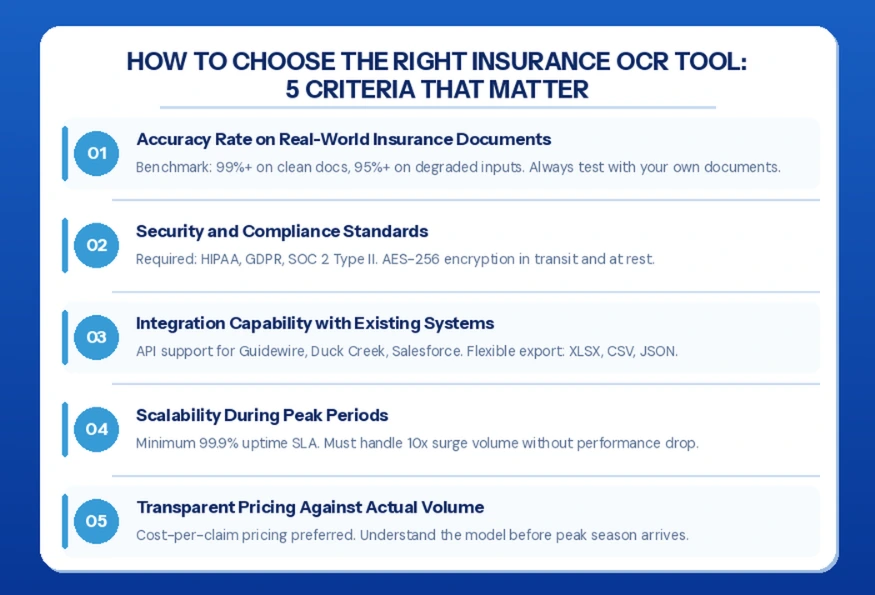
1. Accuracy Rate on Real-World Insurance Documents
Published accuracy figures are measured on clean, high-resolution test documents. The metric that matters for insurance operations is accuracy on real-world inputs: low-light smartphone photos, handwritten estimates, carbon-copy forms, and multi-page hospital bills.
Demand a live demo using your own documents before committing to any platform. A minimum benchmark of 99%+ on clean documents and 95%+ on degraded inputs is the standard for production use.
2. Security and Compliance Standards
Insurance documents contain Protected Health Information (PHI) and Personally Identifiable Information (PII). Any platform handling this data must be certified for HIPAA compliance, GDPR compliance, and SOC 2 Type II. Encryption standards should include AES-256 for data both in transit and at rest.
Look specifically for a Human-in-the-Loop (HITL) verification option. For high-value or ambiguous documents, human review of the AI output provides a final accuracy guarantee that matters in dispute or audit scenarios.
3. Integration Capability with Existing Systems
The best OCR output is useless if it cannot flow directly into your existing claims management system. Prioritize platforms that offer API access with documented endpoints for Guidewire, Duck Creek, and Salesforce integrations, as well as flexible export formats including XLSX, CSV, and JSON.
4. Scalability During Peak Periods
A platform’s performance under normal load tells you little about its performance when you need it most. Require a documented SLA with a minimum 99.9% uptime guarantee and explicit capacity commitments for surge scenarios.
5. Transparent Pricing Against Actual Volume
Cost-per-claim pricing that scales with volume is preferable to flat-fee models for operations with seasonal variance. Understand the pricing structure before peak periods arrive, not during them.
The Future of Claims Processing Is Structured Data
Manual data entry is not a cost of doing business in insurance. It is a liability: one that compounds through errors, delays customer settlements, limits your ability to detect fraud at scale, and puts a hard ceiling on your operational capacity.
Insurance claim JPG to Excel automation removes that ceiling. Every document your team used to spend 15 minutes transcribing becomes a 60-second automated extraction. Every blurry receipt, handwritten estimate, and multi-page hospital bill becomes structured, searchable, audit-ready data.
The firms gaining competitive ground in claims operations right now are not hiring faster. They are processing smarter by eliminating the manual layer between document intake and data analysis entirely.
If you’re ready to modernize your claims workflow, jpgtoexcelconverter.com can help you convert insurance claim documents into structured spreadsheets in minutes, without manual retyping. Upload a sample claim file and see how quickly AI-powered extraction can turn complex claim paperwork into analysis-ready data.
FAQs: Insurance Claim Image to Excel Conversion, Your Top Questions Answered
How do I convert an insurance claim image to Excel?
Upload the claim image (JPG, PNG, or PDF) to an AI-powered OCR platform such as jpgtoexcelconverter.com. The system pre-processes the image, runs character and semantic recognition, and exports a structured XLSX file with labeled columns for each data field. The entire process takes under 60 seconds per document.
What is the best OCR tool for insurance claims processing?
The best tool for insurance claims combines high accuracy on degraded real-world documents, HIPAA and GDPR compliance, seamless integration with claims management platforms, and a Human-in-the-Loop verification option for high-value files. jpgtoexcelconverter.com is purpose-built to meet all of these requirements for insurance operations of any size.
How does OCR technology work for insurance documents?
OCR for insurance documents uses deep learning models trained on insurance-specific layouts to recognize characters, interpret table structures, and apply semantic parsing to identify field types such as policy number, service date, and billed amount. The result is structured data that maps directly to your claims database schema.
Can AI automate the entire insurance claims processing workflow?
AI can automate the data extraction and structuring phases of claims processing with high reliability. The technology handles image intake, OCR extraction, field mapping, and export to your claims system. Adjudication decisions that require contextual judgment still benefit from human review, but the manual data entry component can be fully automated.
Is automated claims processing HIPAA and GDPR compliant?
Yes, when implemented on a certified platform. Compliant providers apply AES-256 encryption in transit and at rest, maintain strict data retention and deletion policies, and provide audit logs for every document processed. Always verify that your OCR vendor holds current HIPAA Business Associate Agreement (BAA) capability and SOC 2 Type II certification before processing live claim data.
- Email: contact@jpgtoexcelconverter.com
- LinkedIn: https://www.linkedin.com/in/jpgtoexcelconverter/
- X: https://x.com/jtoexcelconvert