 March 11, 2026
 11 min read
Convert bill of lading JPG to Excel is the single most impactful step a logistics team can take to eliminate manual data entry and unlock actionable shipment data from static image files. For freight forwarders processing hundreds of BOLs each week, the cost of manual transcription is not theoretical: it appears in overtime hours, customs delays, and reconciliation errors that compound across every shipment.
Quick Answer: How to Convert Bill of Lading JPG to Excel
Upload your BOL image file to an AI-powered OCR platform such as jpgtoexcelconverter.com. The system automatically identifies and extracts every data field, including shipper details, container numbers, and freight charges, then exports the results as a structured XLSX or CSV file in under 60 seconds, with no manual data entry required.
This guide explains the technology behind BOL data extraction, what manual processing costs your operation in real terms, and how to implement automated conversion without technical complexity.
What Is Bill of Lading and What Data Does It Contain?
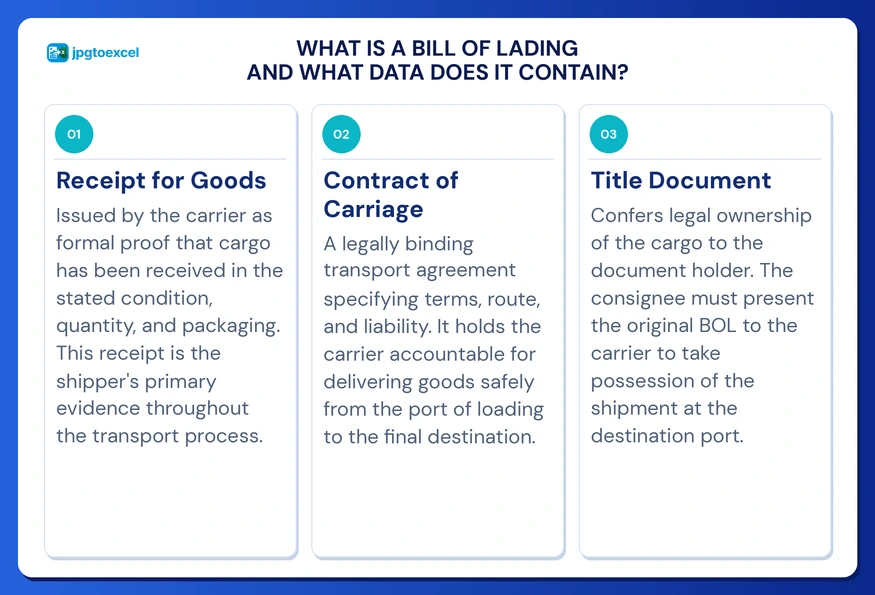
A bill of lading is a legally binding document issued by a carrier that serves simultaneously as a receipt for goods, a contract of carriage, and a title document that transfers ownership of the cargo. In international trade, it is the single most important piece of paper in any shipment, and errors in its data carry direct legal and financial consequences.
Because BOLs originate as physical documents that are photographed or scanned into image files, the data inside them is inaccessible to database queries or spreadsheet formulas until it is extracted and structured.
Key Data Fields Extracted from a Standard BOL
A modern bill of lading OCR software system extracts the following fields from a standard BOL image:
- Shipper name and address
- Consignee name and address
- Notify party details
- BOL number (unique document identifier)
- Vessel name and voyage number
- Port of loading and port of discharge
- Container number and seal number
- Commodity description and HS code
- Gross weight and package count
- Total freight charges and payment terms
According to the International Chamber of Commerce, errors in even a single field on a BOL can trigger customs holds, delay cargo release, and generate demurrage charges that exceed the freight cost itself. This is the stakes environment in which your data entry process currently operates.
The Real Cost of Manual BOL Data Entry
Most logistics operations underestimate the true cost of manual bill of lading data extraction. The visible cost is labor: a trained clerk can process approximately 20 to 30 BOLs per hour under ideal conditions. The invisible cost is the error rate. Research from the McKinsey Global Institute suggests that manual data entry in logistics environments carries an error rate of 1 to 3 percent per field, a figure that compounds dramatically across high document volumes.
How Transcription Errors Cascade Through the Supply Chain
A single digit transposed in a container number does not result in a simple correction. It triggers a chain of downstream failures: customs declarations must be amended, carriers must be notified, arrival notifications go to the wrong parties, and reconciliation teams spend hours tracing the discrepancy back to its source.
Shipping documents to Excel workflows handled manually also introduces latency into your operation. When a clerk processes yesterday’s BOLs this morning, your real-time supply chain visibility is already 24 hours behind. That lag affects customer service, inventory planning, and cash flow forecasting simultaneously.
The Scalability Trap of Paper-Based BOL Processing
Manual BOL processing creates a direct linear relationship between document volume and headcount. To handle twice as many shipments, you need twice as many clerks. There is no efficiency curve, no improvement with volume, and no protection against staff turnover or sick days disrupting operations.
Automated BOL to spreadsheet conversion breaks that relationship entirely. A single platform can process hundreds of documents in the time one clerk handles five, at a consistent accuracy rate, regardless of volume or document source.
How AI OCR Converts Bill of Lading Images to Structured Excel Data
Understanding the technology behind shipping document to Excel conversion helps logistics managers evaluate tools accurately and set realistic expectations for accuracy and integration.
Why Basic OCR Fails on Complex Shipping Documents
Standard optical character recognition reads images character by character, converting pixel patterns into text strings. For a simple form with a fixed layout, this works adequately. BOLs, however, are issued by hundreds of different carriers worldwide, each with their own formatting, table structures, column widths, and font choices.
A template-based OCR system requires a separate configuration for each carrier document type. When a carrier updates their format, the template breaks and extraction fails silently. This is why basic BOL conversion approaches built on rigid templates have a poor track record in production logistics environments.
How Machine Learning Understands BOL Context and Table Structure
Modern AI-powered systems use machine learning to understand document context rather than just character shapes. The model identifies that a 9-digit alphanumeric string adjacent to a barcode is almost certainly a BOL number, that a grid of rows in the center of the document represents line items, and that the footer typically contains freight charge totals.
This contextual intelligence is what makes template-free conversion possible. The system adapts to new carrier formats automatically without manual reconfiguration. It also applies data validation logic, cross-checking whether the sum of individual item weights matches the stated total gross weight, catching arithmetic errors that existed in the original paper document before they enter your database.
Batch Processing at Enterprise Scale
For operations handling large document volumes, batch BOL image-to-Excel conversion is a critical capability. Enterprise-grade platforms process multiple files simultaneously, delivering structured XLSX or CSV output for each document in a single export cycle. This is the difference between a utility suitable for occasional use and one that can anchor a production logistics data pipeline.
Step-by-Step: How to Convert BOL JPG to Excel
The following process works for individual documents and bulk batch submissions using jpgtoexcelconverter.com as your BOL image to Excel converter.
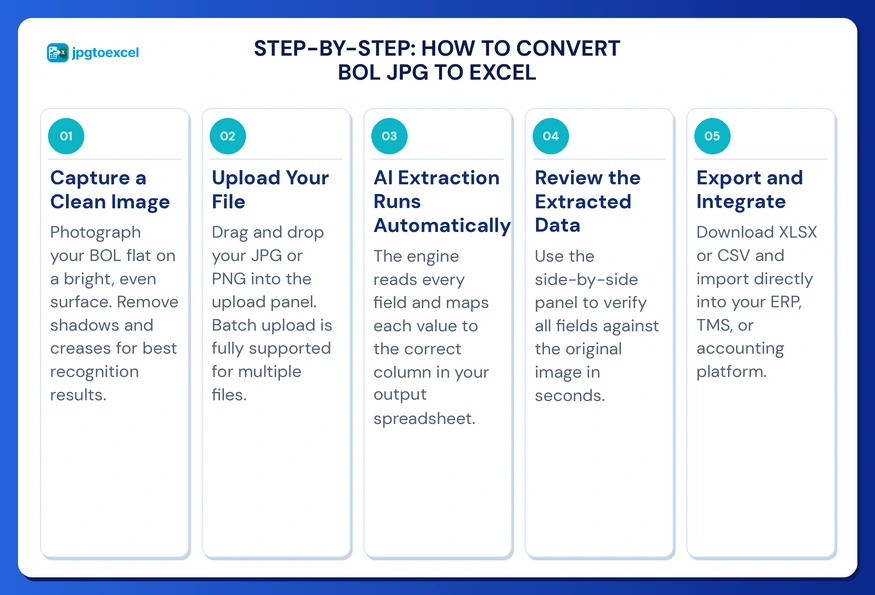
- Capture a clean image: Photograph or scan the BOL on a flat, well-lit surface. Avoid shadows across the document text. Higher resolution source images produce higher accuracy extraction results.
- Upload your file: Drag and drop your JPG or PNG file into the jpgtoexcelconverter.com upload panel. For bulk submissions, use the multi-file batch upload to queue multiple BOLs in one session.
- AI extraction runs automatically: The platform processes the image, applies deskewing to correct any tilt, identifies every data field, and maps each value to its corresponding column in the output spreadsheet.
- Review the extracted data: Use the side-by-side validation panel to compare the original image with the extracted output. This human-in-the-loop review takes under 30 seconds per document and catches edge cases in unusually formatted documents.
- Export and integrate: Download your structured XLSX or CSV and import it directly into your ERP, TMS, or accounting platform. For teams also handling related documents, the same workflow applies to invoice data extraction and purchase order processing.
How to Choose the Right BOL Conversion Tool
Not all shipping document OCR platforms deliver the same results. The following comparison highlights the capability differences between legacy template-based systems and modern AI-powered tools:
| Feature | Template-Based OCR | AI-Powered OCR (jpgtoexcelconverter.com) |
| Handles new or updated carrier layouts | No | Yes |
| Batch processing capability | Limited | Yes |
| Automated data validation | Manual | Built-in |
| ERP and TMS integration | Rarely | Yes |
| Set up time for new document types | Days to weeks | Instant |
| Accuracy on low-quality scans | Low | High |
| Template maintenance required | Ongoing | None |
When evaluating any BOL data extraction platform, prioritize three capabilities above all others.
- Template-free adaptability: Your carriers will change their document formats. A tool that requires manual template updates will create recurring disruption in your workflow.
- Enterprise security standards: BOLs contain sensitive client data, cargo values, and contractual terms. Verify that your chosen platform uses AES-256 encryption at rest, TLS in transit, and complies with data residency requirements for your markets.
- Output format flexibility: Clean XLSX output suitable for direct ERP import is the baseline requirement. For operations managing related document types such as insurance claims or shipping contracts, a platform with broad document coverage reduces vendor overhead.
Connecting Extracted BOL Data to Your Logistics Systems
The value of bill of lading data extraction compounds when the output connects directly to the software systems your team uses daily.
Common Integration Points for BOL Data
Structured XLSX and CSV files from automated BOL conversion are compatible with every major ERP and TMS platform, including SAP, Oracle Transportation Management, Descartes, and MercuryGate. Import mappings are typically configured once and reused for every subsequent batch.
For customs compliance, clean structured BOL data feeds directly into customs declaration software, eliminating the re-keying step that currently causes most filing errors and delays. For finance teams, freight charge fields extracted from BOLs flow into accounts payable workflows, accelerating carrier invoice reconciliation from days to hours.
Operations that build a consistent BOL to spreadsheet conversion workflow report measurable improvements in shipment visibility, reporting turnaround time, and downstream data quality across all connected systems.
Conclusion: Build a Data Pipeline, Not Just a File Conversion Habit
The decision to convert a bill of lading JPG to Excel using an automated OCR platform is not simply a productivity upgrade. It is a structural change in how your operation manages one of its most critical data assets. Every BOL your team processes contains a cluster of operational facts: where goods are, what they weigh, who is responsible for them, and what they cost to move. Keeping that information locked in a static image file is a choice that slows every downstream process connected to it.
jpgtoexcelconverter.com is built for logistics teams that need accurate, scalable bill of lading data extraction without the overhead of template management or manual validation workflows. Whether you are a freight forwarder processing dozens of BOLs daily or a global manufacturer managing thousands of shipment records each month, the path from paper archive to structured data pipeline runs through automated conversion.
FAQ: Converting Bill of Lading JPG to Excel
How do I convert a bill of lading image to Excel?
Upload your BOL image to an AI OCR platform such as jpgtoexcelconverter.com. The system automatically identifies every data field, from shipper and consignee details to container numbers and freight charges, and exports a structured XLSX or CSV file. The full extraction process takes under 60 seconds per document, with no manual data entry required.
What is the best OCR tool for bill of lading documents?
The best BOL OCR tool operates without fixed templates, adapts to any carrier document layout, includes built-in data validation, supports batch processing, and outputs XLSX files compatible with your ERP or TMS. jpgtoexcelconverter.com is built specifically for this use case and handles the varied layouts of international shipping documents without requiring template setup.
Can AI automatically extract data from shipping documents?
Yes. AI-powered OCR platforms use machine learning to identify field positions, understand document context, and extract structured data from shipping documents including BOLs, packing lists, and cargo manifests. Each extracted value is mapped to a labeled spreadsheet column automatically, with no manual field selection required.
How do I automate bill of lading data entry in my logistics operation?
Replace manual transcription with a consistent workflow: capture BOL images at the point of receipt, batch-upload them to an OCR platform, review extracted data in the validation panel, then export directly to your ERP or TMS. This eliminates re-keying entirely and reduces per-document processing time from several minutes to under 60 seconds.
What data fields does a bill of lading contain?
A standard bill of lading contains shipper and consignee details, notify party information, BOL number, vessel and voyage number, ports of loading and discharge, container and seal numbers, commodity description, gross weight, package count, and freight charges. AI extraction platforms capture all of these fields in a single processing pass without manual configuration.
- Email: contact@jpgtoexcelconverter.com
- LinkedIn: https://www.linkedin.com/in/jpgtoexcelconverter/
- X: https://x.com/jtoexcelconvert