
 March 22, 2026
 11 min read
Payroll document JPG to Excel conversion is now the foundational step in any serious HR automation strategy.
According to the American Payroll Association, payroll errors cost businesses up to 1.2% of total payroll annually, a figure that compounds rapidly for any team still transcribing salary data by hand. Every month, HR teams across industries waste dozens of hours manually retyping figures from scanned slips, mobile photos and legacy paper folders, time that could be redirected to higher-value work.
This guide covers everything you need to build a reliable, high-accuracy payroll data extraction workflow: the real cost of keeping payroll data locked in image files, a side-by-side comparison of three conversion methods, a step-by-step automation pipeline, and the best practices that separate 85% accuracy from 99%+.
What Is Payroll Document JPG to Excel Conversion?
Payroll document JPG to Excel conversion is the process of using OCR technology to extract structured salary and employee payment data from image-based payroll documents and convert it into an editable spreadsheet format. This eliminates manual data entry, reduces errors, and makes payroll records searchable, auditable, and ready for integration with HR, payroll, and accounting systems.
At its core, payroll document JPG to Excel conversion transforms payroll information trapped inside static image files into structured digital data that businesses can use. Instead of manually retyping employee names, pay periods, gross wages, deductions, taxes, and net pay amounts from scanned payroll records, OCR and AI-powered extraction tools automatically capture and organize the information into spreadsheet columns.
This capability has become a foundational component of modern HR automation initiatives. As organizations accumulate years of payroll records across scanned documents, mobile photos, PDFs, and legacy archives, converting image-based payroll data into structured Excel files creates the foundation for reporting, compliance audits, payroll reconciliation, and workforce analytics.
For HR teams, the benefit goes beyond efficiency. Converting payroll JPG files into structured data improves accuracy, reduces compliance risks, and enables payroll information to flow directly into HRIS, ERP, and accounting platforms without repetitive manual entry.
Why JPG Payroll Files Are a Hidden Liability for HR Teams
The Real Cost of ‘Dark Data’ in Payroll Management
Dark data is business information that is collected and stored but never analyzed or acted upon because it exists in formats that digital systems cannot read. In payroll management, dark data typically means salary slips stored as scanned JPGs, PNG snapshots of old stubs, and boxes of paper records that have never been digitized.
The IBM Institute for Business Value estimates that 80% of enterprise data is unstructured, and payroll images are a textbook example. When an auditor requests three years of payroll records, a folder of JPG files is not a compliant response. When your finance team wants to model labor costs, images cannot feed a dashboard.
Manual data entry from payroll images carries a well-documented error rate of 1% to 3% per field, according to research published in the Journal of Accountancy. On a 500-employee payroll run, that translates to 5 to 15 wrong figures entering your system every single cycle.
What You Lose When Payroll Data Stays in Image Format
A JPG file cannot be searched, filtered, sorted, or fed into a formula. It cannot trigger an automated payment, populate a tax report, or sync with your HRIS. Keeping payroll data in image format creates four compounding problems:
- Zero searchability. You cannot locate a specific employee record without opening every file manually.
- No HRIS integration. Payroll automation software requires structured data. Images are invisible to these systems.
- Audit and compliance risk. Tax authorities and labor inspectors expect organized, searchable digital records.
- Financial forecasting blind spots. Labor cost modeling requires clean, aggregated data, not image files.
See how fast you can unlock your payroll data with jpgtoexcelconverter.com
3 Methods to Convert Payroll Documents from JPG to Excel
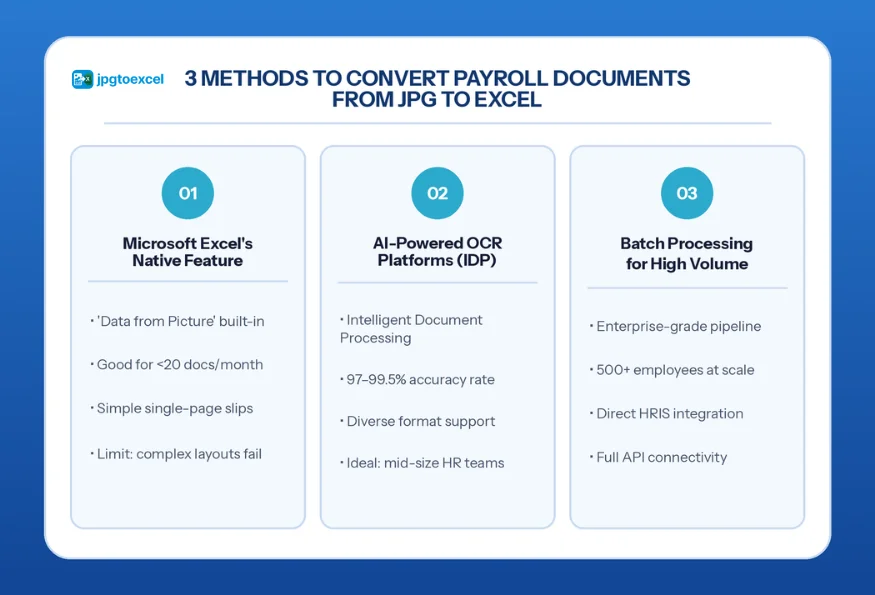
Not every team has the same volume, budget, or technical infrastructure. Here is a clear comparison of the three main methods available in 2026:
Method 1: Microsoft Excel’s Native ‘Data from Picture’ Feature
Excel’s built-in Insert > Data > Data from Picture function uses Microsoft’s cloud OCR to scan an image and populate a worksheet. It works reasonably well for simple, single-page salary slips with clean fonts and high contrast.
- Best for: Freelancers, small business owners, and HR teams processing fewer than 20 documents per month.
- Key limitation: It struggles with multi-column layouts, handwritten fields, low-resolution scans, and documents containing merged cells. For consistent payroll automation, it is not a scalable solution.
Method 2: AI-Powered OCR Platforms and Intelligent Document Processing
Intelligent Document Processing (IDP) is a category of AI software that combines optical character recognition with machine learning to identify document structure, classify fields, and extract data with high precision. Unlike basic OCR, IDP understands that a number in the top-right corner of a salary slip is likely an employee ID, not a phone number.
Enterprise IDP platforms consistently achieve 97% to 99.5% accuracy on clean payroll documents, according to benchmarks published by Forrester Research. Platforms like jpgtoexcelconverter.com are specifically engineered for this use case, handling diverse salary slip formats, varied layouts, and mixed-language documents.
Best for: Mid-size HR teams processing 20 to 500 documents per month who need consistent, auditable output without manual correction.
Method 3: Batch Processing for High-Volume Payroll Operations
Large enterprises run payroll for thousands of employees across multiple entities and jurisdictions. Processing documents one at a time is not viable at this scale. Batch processing systems ingest entire document queues simultaneously, apply OCR and field mapping in parallel, and push structured output directly to the target HRIS via API.
This approach integrates directly with platforms like SAP SuccessFactors, Workday, and ADP, eliminating the manual export-import loop entirely. For more on how this fits into a broader HR document automation workflow, see our comparison of the top tools available in 2026.
Best for: Enterprise HR and finance operations teams managing 500+ employees with recurring, high-volume payroll cycles.
Step-by-Step: How the JPG to Excel Conversion Process Works
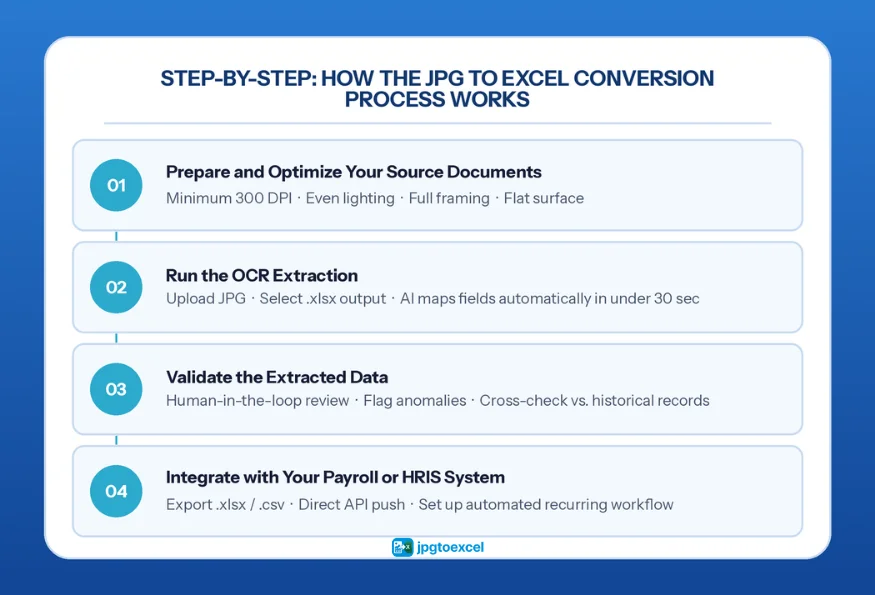
The following workflow applies whether you are processing a single salary slip or a batch of 1,000 documents. Each step is designed to be repeatable and auditable.
Step 1: Prepare and Optimize Your Source Documents
Document quality is the single biggest variable in OCR accuracy. Before uploading, verify:
- Resolution is at least 300 DPI. Below this threshold, characters like ‘5’ and ‘S’ or ‘0’ and ‘O’ become ambiguous for the OCR engine.
- Lighting is even, with no shadows crossing text fields. Shadows are the leading cause of misread salary figures.
- The document is fully within the frame, not cropped at the edges.
- The image is correctly oriented (0-degree rotation). Tilted scans produce misaligned columns in the output spreadsheet.
Step 2: Run the OCR Extraction
Upload your payroll document JPG to your chosen platform. Tools like jpgtoexcelconverter.com automatically detect the page layout, identify table structures, and map fields to the correct Excel columns. Select your output format (.xlsx or .csv) and trigger processing.
The engine distinguishes headers from data rows, identifies currency fields, and preserves the original column structure. For most standard salary slips, this takes under 30 seconds.
Step 3: Validate the Extracted Data
No automated system should operate without a validation layer. Modern IDP platforms flag records where:
- A salary figure falls outside the historical range for that employee.
- A required field (employee ID, pay period, net salary) is missing or blank.
- Character confidence scores drop below the platform threshold (typically 95%).
This ‘human-in-the-loop’ checkpoint takes 2 to 5 minutes per batch and prevents downstream errors from reaching your payroll system.
Step 4: Integrate with Your Payroll or HRIS System
Once validated, the structured data moves directly into your business ecosystem. Export options include standard .xlsx for manual import, .csv for legacy systems, or direct API push to enterprise HRIS platforms. For teams building a fully automated pipeline, this step should be trigger-based; new documents in the input folder automatically initiate extraction, validation, and delivery. This is the foundation of frictionless payroll document digitization, which we cover in depth in our tax document automation guide.
Start converting your first payroll document free at jpgtoexcelconverter.com
Best Practices for 99%+ Accuracy in Payroll Data Extraction
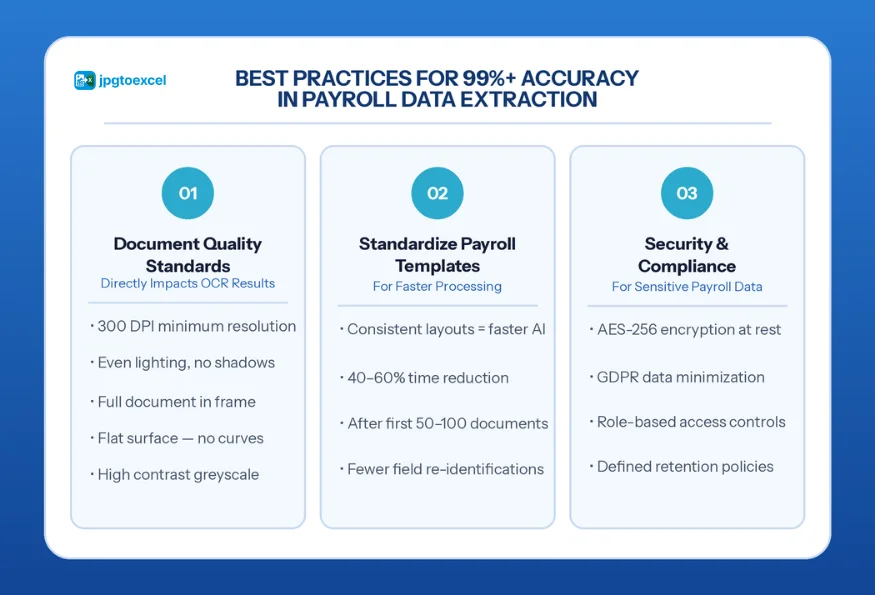
Document Quality Standards That Directly Impact OCR Results
The difference between 90% accuracy and 99% accuracy is almost always in the input, not the algorithm. Apply these five standards to every document before processing:
- Shoot at 300 DPI minimum. For mobile captures, use a document scanning app rather than the standard camera app.
- Use consistent, even lighting. Natural daylight from the side (not directly overhead) eliminates most shadow problems.
- Frame the full document with a 10px border visible on all sides. Edge cropping causes the OCR engine to miss fields at the margins.
- Ensure documents are flat. Curved pages from bound ledgers are a common source of distortion.
- Convert to high-contrast greyscale before uploading if the original photo has a colored background or watermark.
How to Standardize Payroll Templates for Faster Processing
OCR platforms learn from repeated exposure to consistent layouts. If your organization uses a standard salary slip template across all departments, the processing engine builds a field map that dramatically reduces both processing time and error rate.
Standardizing templates produces measurable gains: teams using consistent layouts typically see processing time cut by 40% to 60% after the first 50 to 100 documents, as the platform no longer needs to re-identify field positions from scratch.
Security and Compliance Considerations for Payroll Data
Payroll records contain some of the most sensitive personal data your organization holds. Any platform handling this data must meet the following minimum standards:
- AES-256 encryption at rest and in transit.
- GDPR compliance for teams operating in or dealing with EU residents, per GDPR Article 5 data minimization principles.
- Role-based access controls to ensure only authorized HR personnel can view extracted records.
- Defined data retention policies aligned with local labor law requirements.
jpgtoexcelconverter.com applies enterprise-grade AES-256 encryption to all uploads and processed files, with automatic deletion after a configurable retention period. For teams managing insurance claim document processing or other sensitive document types alongside payroll, the same security architecture applies across all workflows.
Conclusion: The Payroll Document JPG to Excel Workflow Is Now a Competitive Baseline
The window for treating payroll document JPG to Excel conversion as an optional upgrade is closing. In 2026, the teams that have automated this workflow are running faster payroll cycles, passing audits without scrambling, and feeding real-time labor cost data into their financial models. Those still transcribing by hand are paying a 1% to 3% error tax on every payroll run.
The path forward is straightforward: standardize your document capture, select a platform that matches your volume and accuracy requirements, build a validation step into the pipeline, and integrate the output directly with your HRIS. Each step is a multiplier on the last.
Whether you are processing 10 salary slips a month or 10,000, the right OCR payroll processing tool eliminates the bottleneck entirely. The infrastructure exists, the accuracy benchmarks are proven, and the ROI is measurable from the first pay cycle.
FAQs about Payroll Document JPG to Excel
How do I convert a payroll document JPG to Excel?
Upload your payroll document JPG to an OCR platform such as jpgtoexcelconverter.com. The tool scans the image, detects the table structure, extracts all text and numeric fields, and exports them as an editable .xlsx file. The process takes under 30 seconds for a standard salary slip and requires no manual data entry.
What is the most accurate tool for converting salary slip images to Excel?
AI-powered IDP platforms deliver the highest accuracy for salary slip image to Excel conversion, typically achieving 97% to 99.5% on clean documents. jpgtoexcelconverter.com is purpose-built for payroll document formats, handling multi-column layouts, handwritten fields, and diverse template styles with high precision.
Can Microsoft Excel read payroll data directly from an image?
Yes, Excel includes a built-in ‘Data from Picture’ feature that can extract data from simple payroll images. However, it is limited to single-page documents and struggles with complex multi-column layouts and low-resolution scans. For professional payroll processing at any meaningful volume, a dedicated OCR platform delivers significantly higher accuracy and consistency.
How accurate is OCR technology for payroll documents?
Modern AI-powered OCR platforms achieve 97% to 99.5% accuracy on standard payroll documents when source images meet minimum quality standards (300 DPI, even lighting, flat surface). Basic OCR tools average 85% to 90%. The gap widens significantly on handwritten fields, low-contrast scans, or complex multi-column layouts.
How do I automate payroll data entry from scanned documents?
Automate payroll data entry by connecting an IDP platform to a document intake folder and configuring API output to your HRIS. Incoming payroll document JPGs are automatically extracted, validated against historical records, and pushed to your payroll system without manual intervention. Tools like jpgtoexcelconverter.com support this end-to-end workflow for teams of any size.
- Email: contact@jpgtoexcelconverter.com
- LinkedIn: https://www.linkedin.com/in/jpgtoexcelconverter/
- X: https://x.com/jtoexcelconvert


