 November 20, 2025
 11 min read
AI OCR for logistics documents is changing how freight forwarders, customs brokers, and warehouse teams handle paperwork. Instead of manually retyping data from bills of lading, packing lists, air waybills, or customs forms, AI-powered OCR automatically extracts key shipment information and converts it into structured, editable data.
In reality, however, logistics documents rarely arrive in perfect condition. They may come as scanned PDFs, mobile phone photos, stamped forms, or low-quality copies, making reliable data extraction much harder than reading a clean digital file. The best AI OCR solutions go beyond template-based recognition to understand varied layouts and extract fields such as container numbers, HS codes, and consignee details across multiple carrier formats.
This guide explains how AI OCR for logistics documents works, which document types it supports, the business problems it solves, and what to look for when comparing different solutions in 2026. You’ll also learn how to evaluate OCR accuracy, integration options, and implementation approaches to choose the right tool for your logistics workflow.
What Is AI OCR for Logistics Documents and How Is It Different from Regular OCR?
Traditional OCR software works by matching a scanned page against a known template. That works fine when every document looks identical, but logistics paperwork rarely does. A bill of lading from a European carrier can look nothing like one from a Southeast Asian freight line, and template-based tools tend to break the moment a field moves half an inch.
Why template-based OCR fails on shipping paperwork
Shipping documents change format constantly. Carriers redesign their forms, brokers add stamps and handwritten notes, and scan quality varies from a crisp office printout to a photo taken on a warehouse floor. A template-matching engine has to be reconfigured every time one of these variables shifts, which makes it impractical for teams that receive paperwork from dozens of different sources.
How layout-agnostic AI reads any carrier’s format
AI OCR for logistics documents uses machine learning models trained to recognize what a field means, not just where it sits on a page. It identifies a “container number” or “port of discharge” by context and surrounding text, so it can read a document it has never seen before. If you want a deeper look at what actually determines OCR accuracy on a messy scan, that breakdown covers resolution, lighting, and handwriting factors in detail.
Which Logistics Documents Can AI OCR Extract Data From?
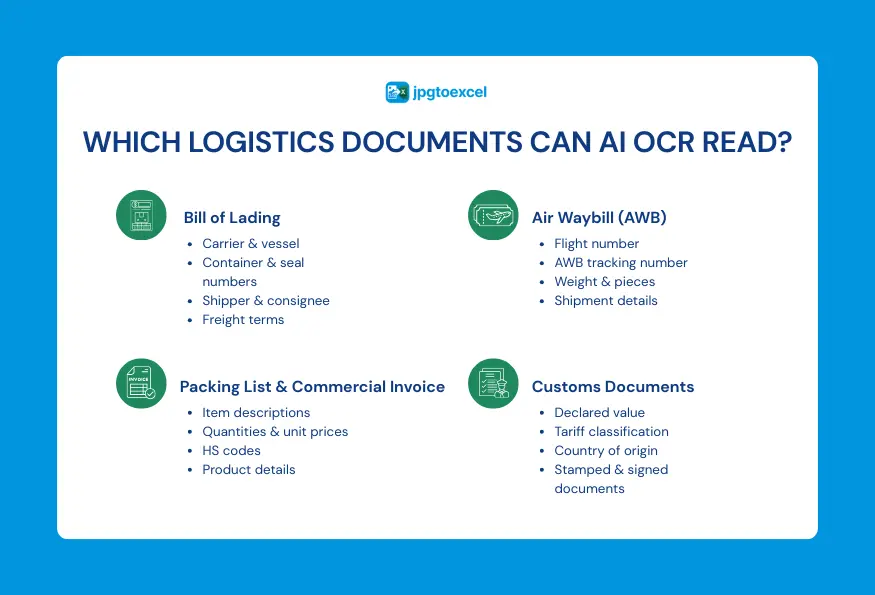
The range of documents an AI OCR tool can handle is usually the clearest sign of how mature the platform is. Below are the four document types that come up most often in freight and customs workflows, along with the specific fields each one typically contains.
Bills of lading: carrier, vessel, container, and consignee fields
A bill of lading is dense with structured data: carrier name, vessel and voyage number, container and seal numbers, shipper and consignee addresses, and freight terms. AI OCR tools extract each of these into separate fields rather than dumping the page as one block of text, which makes the output usable in a spreadsheet without manual cleanup. Ocean carriers each design their own layout, so a tool also needs to correctly separate the notify party from the consignee, a distinction that trips up simpler OCR software more often than it should.
Air waybills: flight numbers, weights, and tracking data
Air waybills carry their own set of fields: flight number, gross and chargeable weight, number of pieces, and the AWB tracking number itself. Because airlines format these documents differently, an AI model that recognizes fields by context, not by fixed position, handles the variation far better than a rigid template. A house AWB and a master AWB can also reference each other on the same shipment, so accurate extraction of both tracking numbers matters when reconciling records later.
Packing lists, commercial invoices, and HS codes
Packing lists and commercial invoices pair item descriptions with quantities, unit prices, and HS codes, and the two documents often need to be cross-checked against each other. Pulling HS codes accurately matters here, since a mismatched code can trigger a customs hold before the shipment even reaches the border. Line-item extraction is also where volume matters most: a commercial invoice with forty line items needs the same field-by-field accuracy as a one-line shipment, and that consistency is a good way to judge how well a given tool actually performs.
Customs declarations and certificates of origin
Customs declarations and certificates of origin tend to include a mix of typed fields and handwritten signatures or stamps, which makes them one of the harder document types to process reliably. A tool that can still extract the declared value, tariff classification, and country of origin from a stamped page is doing meaningful work. Certificates of origin in particular often carry a chamber of commerce seal directly over part of the printed text, so it is worth testing a sample document with a stamp before assuming a tool will handle your real-world paperwork well.
What Business Problems Does AI OCR Solve in Logistics?
Manual data entry is not just slow, it is also where most costly mistakes happen. Automating the extraction step addresses three problems that show up repeatedly in logistics operations.
Faster processing and shorter dwell times
When a bill of lading has to be retyped by hand before a shipment can be released, that step alone can add hours to a container’s dwell time at port. Extracting the same data automatically shortens that gap and lets teams move on to exception handling instead of transcription. For operations processing dozens of shipments a week, that time adds up to a meaningful chunk of a team’s working hours every month.
Fewer costly errors in customs and compliance
A single mistyped HS code or container number can delay a shipment at customs for days. Automated extraction removes the manual retyping step where most of these errors originate, though a human should still review any field the system flags as low confidence. This matters most on high-value shipments, where a compliance hold can carry demurrage fees on top of the delay itself.
Real-time visibility across the supply chain
Once document data is captured digitally instead of sitting in a scanned PDF, it can feed dashboards, TMS records, or a simple tracking spreadsheet the same day the document arrives. That visibility is what lets a customer service team answer “where is my shipment” without digging through email attachments. It also gives operations managers a clearer picture of which carriers or lanes are generating the most paperwork delays, information that is hard to gather when documents sit unprocessed in a shared inbox.
Enterprise Platform or Quick-Convert Tool: Which One Fits Your Logistics Documents?
Not every team needs the same kind of AI OCR setup, and that is a good thing, because it means there is a tool sized correctly for almost every operation. Some teams are processing thousands of documents a day across multiple systems, while others just need to turn a stack of scanned bills into a clean spreadsheet before lunch. Knowing which category you fall into saves time and budget.
Signs you need full TMS or ERP integration
If your team is processing high volumes of documents daily and that data needs to flow automatically into a TMS, WMS, or ERP system like SAP TM or Oracle TMS, an enterprise platform with API access is worth the investment. These platforms are built for connecting extracted data directly to your TMS or ERP via an OCR API, and they typically come with per-document pricing that reflects that level of integration.
Signs a no-code converter is enough
If your team handles a smaller, steadier volume, say a few dozen bills of lading or air waybills a week, and the goal is simply to get that data into Excel without setting up a developer project, a no-code converter does the job just as well and with far less overhead. There is no API to configure, no IT ticket to file, and no monthly contract tied to per-document fees.
Comparison table: enterprise platform vs. quick-convert tool
| Enterprise OCR platform | Quick-convert tool | |
| Best for | High-volume, multi-system operations | Small to mid-size batches |
| Setup | API integration, IT involvement | Upload and go, no setup |
| Output | Feeds directly into TMS/ERP | Clean Excel file |
| Pricing | Per-document or subscription tiers | Free or low-cost batch pricing |
How Do You Implement AI OCR in Your Logistics Workflow?
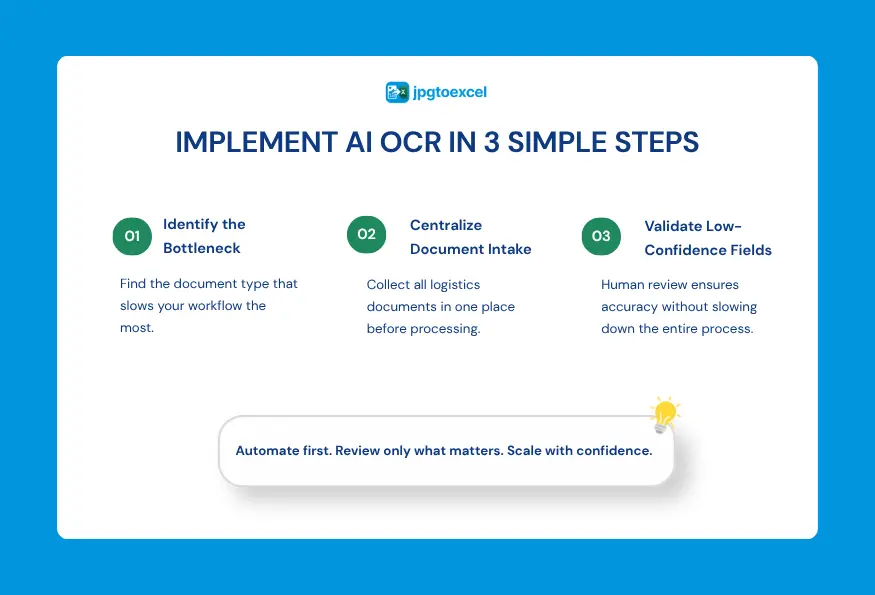
Rolling out AI OCR does not need to be a months-long project. Most teams get value out of it within the first few batches if they follow three steps in order.
Step 1: Identify your biggest document bottleneck
Start by pinpointing which document type causes the most delay today, whether that is bills of lading sitting in an inbox or packing lists that need manual cross-checking against invoices. Fixing the biggest bottleneck first produces the clearest, fastest win.
Step 2: Centralize document intake
Route incoming documents, whether scanned, photographed, or emailed, through a single intake point instead of scattering them across inboxes and shared drives. This makes it far easier to batch-process them and track what has and has not been converted.
Step 3: Add human-in-the-loop validation for low-confidence fields
No OCR system, AI-based or otherwise, gets every field right on a damaged or handwritten document. Building in a quick human review step for any field the tool flags as uncertain keeps accuracy high without slowing the whole workflow down. Most teams find that only a small percentage of fields ever need this kind of manual check once the intake process is centralized, and that percentage tends to drop further as staff get familiar with which document types need the closest attention.
How Do You Convert Shipping Documents to Excel Without Any Setup?
For teams that just need a fast, no-friction way to digitize paperwork, the process is deliberately simple. There is no software to install and no account setup beyond uploading a batch of files.
Uploading a batch of BOLs or AWBs
You can convert a stack of bills of lading to Excel without any setup by dragging up to 100 images or scanned PDFs into the tool at once. The system reads each document individually, so mixed batches of bills of lading and air waybills can be processed together.
What the AI extracts automatically
The tool identifies key fields, carrier name, container number, consignee, weight, and dates, and lays them out in a structured Excel file ready for review. For teams handling recurring volume, the same workflow works well for processing a full week’s worth of shipping documents in one batch rather than converting files one at a time.
Frequently Asked Questions About AI OCR for Logistics Documents
These are the questions that come up most often from freight forwarders and customs brokers evaluating an AI OCR tool for the first time.
Can AI OCR handle documents in multiple languages?
Most AI OCR models are trained on multilingual datasets and can read shipping documents in several languages, though accuracy is generally highest for languages with strong training data coverage, such as English, Mandarin, and major European languages. If your paperwork regularly comes in a less common language, or mixes two languages on the same page as some customs forms do, it is worth testing a sample batch before committing to a workflow.
How accurate is OCR for logistics documents?
Accuracy depends heavily on scan quality. Clean, computer-generated documents typically extract with very high accuracy, while stamped, handwritten, or low-resolution scans require more human review. That is why a human-in-the-loop step for low-confidence fields matters more than any single accuracy claim a vendor makes. If a vendor quotes a flat accuracy percentage without describing the document conditions it was measured on, treat that number as a starting point rather than a guarantee for your own paperwork.
Can it integrate with our TMS or ERP?
Enterprise-grade platforms generally offer API access for direct integration with systems like SAP TM, Oracle TMS, or Manhattan WMS. No-code converters are not built for that kind of integration; they are designed to output a clean spreadsheet you can import manually or attach to an existing record. Some teams start with a no-code converter to validate the workflow before investing in a full API integration later, which is a reasonable way to test the concept without a large upfront commitment.
Does it work on handwritten or stamped documents?
AI OCR can extract data from documents with stamps and some handwriting, but results vary depending on legibility. A customs stamp overlapping a printed field, or a signature scrawled across a total, is still the kind of thing that benefits from a quick manual check rather than full automation. Printed block letters, the kind often used to fill in a shipper’s name by hand, tend to extract far more reliably than cursive handwriting.
What file formats does AI OCR accept?
Most tools accept scanned PDFs and common image formats like JPG and PNG, and many also work directly from a photo taken on a phone at the loading dock. Image quality still matters: a document photographed at an angle or in poor lighting will generally produce lower accuracy than a flatbed scan, even with a strong AI model behind it.
Conclusion
AI OCR for logistics documents has evolved from a simple text recognition tool into a practical way to automate document-heavy logistics workflows. Whether you’re processing bills of lading, air waybills, packing lists, commercial invoices, or customs documents, the right solution can reduce manual data entry, improve accuracy, and move shipment information into your TMS, ERP, or spreadsheets much faster.
As this guide has shown, choosing the right platform depends on your document volume, integration requirements, security needs, and the variety of carrier formats you handle every day. Enterprise APIs may be the right fit for large-scale automation, while browser-based tools are often enough for teams that simply need clean, structured data without lengthy implementation.
If you’d like to see how AI OCR performs on your own logistics documents, the easiest place to start is with a real batch of files.
Upload your files, review the extracted data, and see how AI OCR for logistics documents can eliminate hours of manual data entry free, with no signup required.

- Email: contact@jpgtoexcelconverter.com
- LinkedIn: https://www.linkedin.com/in/jpgtoexcelconverter/
- X: https://x.com/jtoexcelconvert