 November 28, 2025
 11 min read
Understanding How OCR Works is the key to knowing why some tools can accurately convert scanned documents into editable Excel spreadsheets while others struggle with complex layouts. Every day, businesses use OCR to process invoices, receipts, contracts, bank statements, and other paper-based documents, yet the technology behind these conversions often remains invisible to the people using it.
At its core, How OCR Works involves much more than simply recognizing letters. Modern Optical Character Recognition combines image preprocessing, character detection, AI-powered recognition models, and post-processing to transform images into searchable, editable data. When documents contain tables, the challenge becomes even greater because OCR must reconstruct rows, columns, and cell relationships instead of extracting plain text alone.
In this guide, you’ll learn how OCR works step by step, how modern AI has improved recognition accuracy, why table extraction is more difficult than text recognition, and what makes specialized image-to-Excel OCR tools more effective for structured documents.
What Is OCR?
OCR stands for Optical Character Recognition. It’s the technology that converts images containing text, whether from a scanner, a camera photo, or a screenshot, into machine-readable, editable data. Without OCR, a scanned document is just a picture; you can’t search it, copy text from it, or edit it in a word processor. OCR is what makes that content usable.
OCR vs. ICR vs. Intelligent Word Recognition: Clearing Up the Terms
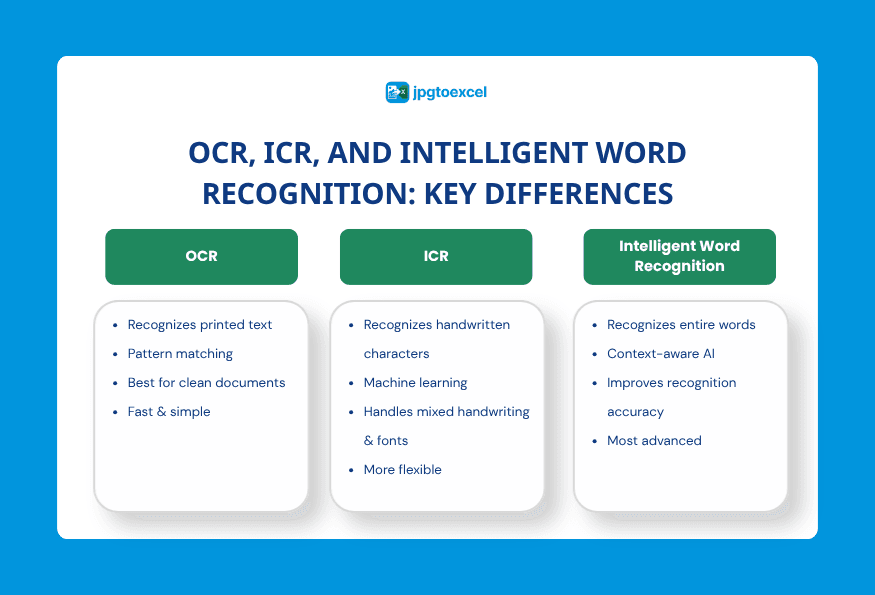
These terms get used interchangeably, but they describe different levels of sophistication:
- Simple or Pattern-Based OCR compares each character in an image to a stored library of font templates. It works well on clean, predictable fonts but struggles with anything outside its training set.
- Optical Mark Recognition (OMR) identifies checkboxes, filled bubbles, and marks like logos or watermarks, rather than reading letters.
- Intelligent Character Recognition (ICR) uses machine learning to recognize characters the way a person does, by learning shapes, curves, and patterns rather than matching fixed templates. This is what allows modern OCR to handle handwriting and unusual fonts.
- Intelligent Word Recognition (IWR) takes this further, analyzing entire words as a single unit instead of piecing them together character by character.
A Brief History: From 1970s Pattern Matching to Deep Learning
OCR isn’t new. Early systems from the 1970s, including work that led to Kurzweil’s reading machines for the blind, relied entirely on pattern matching against a fixed set of fonts. Through the 1990s, OCR was widely used to digitize newspaper archives, though accuracy was inconsistent outside of clean, printed text. The real shift came with machine learning and later deep learning, which replaced rigid template matching with models trained on millions of real examples, dramatically improving accuracy across fonts, languages, and even messy handwriting.
The OCR Pipeline: From Pixels to Text
Regardless of which engine is used, most OCR systems follow the same general sequence of steps to go from a raw image to structured text.
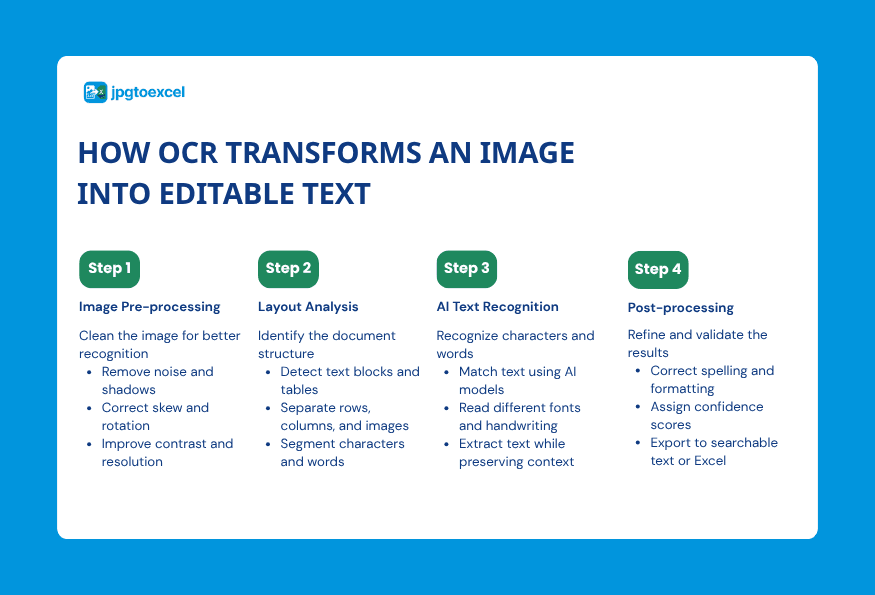
Step 1: Image Acquisition and Pre-processing
The process starts with an image, whether from a scanner, a smartphone camera, or an uploaded file. Before any recognition happens, the software cleans up the image. This includes deskewing (straightening a tilted scan), despeckling (removing small dots of noise), and binarization, which converts the image into pure black and white so the software can clearly separate text from background.
Step 2: Layout Analysis and Segmentation
Next, the software analyzes the overall structure of the page. It identifies which regions contain text, images, or tables, then breaks the text areas down further into lines, then words, then individual characters. This step determines the reading order and prevents the system from mixing up unrelated blocks of content.
Step 3: Character Recognition: Pattern Matching vs. Feature Extraction
This is where the actual recognition happens, using one of two approaches. Pattern matching compares each character shape against a library of known templates, which works reliably only when the font matches something the system has already seen. Feature extraction, used by modern deep learning models, instead analyzes attributes like curves, intersections, and line angles, allowing the system to recognize characters it has never seen in that exact font before.
Step 4: Post-processing and Confidence Scoring
Once characters are recognized, the software applies context to correct likely errors, using dictionaries and grammar rules to fix things like a zero mistaken for the letter O. Most modern OCR engines also assign a confidence score to each recognized character or word, which lets downstream software flag low-confidence results for a human to double-check rather than silently accepting a possible mistake.
How OCR Recognizes Tables and Turns Them Into Excel Rows and Columns
Most explanations of OCR stop at plain text, but reading a table correctly is a meaningfully harder problem, and it’s the part that matters most when the goal is turning an image into a usable spreadsheet rather than a block of text.
Detecting Grid Lines and Cell Boundaries
Before any text inside a table can be read correctly, the system first needs to detect the table itself. This usually involves identifying straight horizontal and vertical lines, or in the case of borderless tables, detecting consistent whitespace gaps that imply column and row boundaries. Getting this step wrong means everything that follows is misaligned.
Reconstructing Rows, Columns, and Merged Cells
Once boundaries are identified, the system maps each recognized piece of text to a specific row and column position, effectively rebuilding the grid that existed in the original document. Merged cells, where a single cell spans multiple columns or rows, add complexity here, since the system has to recognize that a piece of text belongs to a wider region rather than a single standard cell.
Why Table OCR Is Harder Than Plain-Text OCR
Plain-text OCR only needs to get the reading order right, top to bottom, left to right. Table OCR has to preserve a two-dimensional relationship between every value and its row and column, and a single misdetected line can shift an entire column out of alignment. This is why a tool built specifically for converting images to spreadsheets, rather than general-purpose text OCR, tends to produce noticeably more usable results for financial documents, invoices, and data tables. Anyone curious about the practical side of this can see it in action in this step-by-step guide to converting images to Excel.
Traditional Rule-Based OCR vs. Modern AI-Based OCR
Understanding the difference between these two approaches explains why OCR accuracy has improved so dramatically over the past decade.
Rule-Based (Pattern Matching) OCR
Rule-based OCR compares each character to a fixed set of pre-trained font templates. It performs well on clean, standardized documents using fonts it has already seen, but accuracy drops sharply with unfamiliar fonts, low-quality scans, or handwriting.
Deep Learning and Intelligent Character Recognition
Deep learning models, often built on convolutional neural networks, learn to recognize characters from the underlying shapes and features rather than exact matches. This allows them to generalize across new fonts, distorted text, and even handwriting with far higher accuracy than rule-based systems.
Here’s how the two approaches compare directly:
| Criteria | Rule-Based OCR | AI/Deep Learning OCR |
| Accuracy on standard fonts | High | High |
| Accuracy on unfamiliar fonts | Low | High |
| Handwriting support | Very limited | Moderate to good |
| Handles distorted or low-quality images | Poor | Good |
| Setup and training required | Minimal | Requires trained models |
What Affects OCR Accuracy
Even the best OCR engine can’t fully compensate for a poor-quality source image, so a few practical factors matter more than which tool you choose.
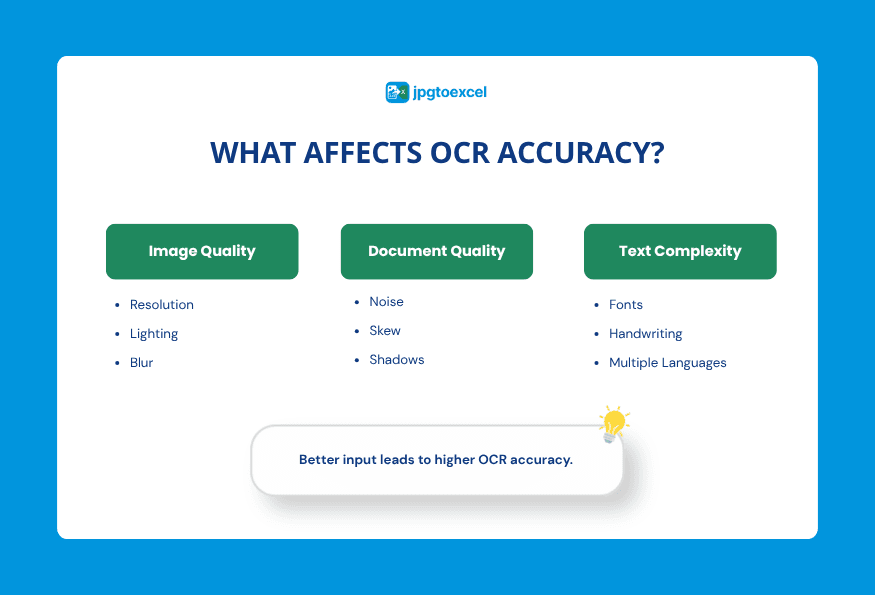
Image Resolution and Lighting
Higher resolution scans and photos give the software more detail to work with. A resolution around 300 dpi is generally recommended for reliable results, and even lighting without harsh shadows or glare significantly improves accuracy.
Skew, Noise, and Document Quality
A tilted photo or scan forces the software to correct alignment before it can even begin recognizing characters, and any correction introduces some risk of error. Smudges, creases, and background clutter add further noise that the pre-processing stage has to filter out.
Font, Handwriting, and Language Complexity
Inconsistent fonts, decorative typefaces, and handwriting all reduce accuracy compared to standard printed text. Scripts with complex characters, such as Chinese, Japanese, or Arabic, also require models specifically trained for that language rather than a generic one. A model trained mostly on English documents will typically struggle with a language that uses an entirely different character set, even if the image quality is otherwise perfect.
In practice, these factors compound. A slightly blurry photo of a handwritten form in a low-resource language is a far harder case than a crisp scan of printed English text, even for the most advanced OCR engine available today.
Where OCR Is Used Today
OCR has moved well beyond digitizing old newspaper archives and now sits quietly behind many everyday business processes.
Finance and Accounting
Invoices, receipts, and bank statements are among the most common OCR use cases, since manually retyping financial figures is slow and error-prone at any real volume.
Healthcare, Logistics, and Accessibility
OCR helps digitize patient records, reads shipping labels and tracking numbers in logistics, and powers accessibility tools that read printed text aloud for people with visual impairments.
Research, Education, and Everyday Productivity
Students and researchers use OCR to pull data tables out of scanned journals and textbooks instead of retyping them, while office workers rely on it to turn photographed whiteboards, printed schedules, or old paper archives into searchable, editable files. Much of this happens through free browser-based tools rather than dedicated scanning hardware, which is part of why OCR has become so widely accessible in the last few years.
FAQs about How OCR Works
Is OCR the same as AI?
Not exactly. OCR is a specific application, while modern OCR increasingly relies on AI, specifically machine learning and deep learning, to achieve much higher accuracy than older pattern-matching approaches.
How accurate is OCR today?
For clean, well-lit printed text, modern OCR engines regularly achieve accuracy above 95 to 99 percent. Accuracy drops with handwriting, poor image quality, or unusual fonts.
Can OCR read handwriting?
Yes, to a degree. Intelligent Character Recognition, built on machine learning, can read many handwriting styles reasonably well, though accuracy is generally lower and more variable than with printed text.
What’s the difference between OCR and ICR?
OCR is the umbrella term for reading text from images. ICR is a more advanced type of OCR that uses machine learning to recognize characters based on learned patterns rather than fixed templates, which is what makes it better at handling handwriting and varied fonts.
Can OCR preserve table structure when converting to Excel?
Yes, but it requires a system specifically designed to detect grid lines, cell boundaries, and column alignment, not just recognize individual characters. General-purpose OCR tools that only extract raw text often lose the row and column structure entirely.
Final Thoughts
Once you understand how OCR works, it becomes much easier to choose the right solution for your documents. While the core OCR process follows the same stages (image preprocessing, text recognition and post-processing), not every tool is designed to handle complex layouts. While extracting paragraphs is relatively straightforward, accurately rebuilding tables, rows and columns requires more advanced document understanding and structure recognition.
If your workflow involves invoices, receipts, financial statements, or other tabular documents, a specialized JPG to Excel converter can deliver cleaner spreadsheets with less manual correction than a general-purpose OCR tool.
- Email: contact@jpgtoexcelconverter.com
- LinkedIn: https://www.linkedin.com/in/jpgtoexcelconverter/
- X: https://x.com/jtoexcelconvert