 January 28, 2026
 11 min read
Audit automation is transforming how modern audit teams handle growing workloads without expanding headcount. As organizations generate more invoices, receipts, contracts, and supporting documents than ever before, auditors are expected to review larger data volumes, identify risks faster, and maintain complete audit trails, all while meeting tighter deadlines.
However, audit automation isn’t a single piece of software. It refers to a broad ecosystem of technologies that streamline different stages of the audit process, from document digitization and OCR to data extraction, reconciliation, analytics, and end-to-end audit management. Understanding where each technology fits is essential for choosing the right solution instead of investing in tools that solve the wrong problem.
In this guide, you’ll learn what audit automation really means, how it differs from OCR and document digitization, the key technologies powering modern audit workflows, and why converting paper-based evidence into structured Excel data is often the first step toward a faster, more efficient audit process.
What Is Audit Automation?
Audit automation is technology used to reduce the manual steps involved in planning, executing, and reporting on an audit. Instead of auditors retyping figures from PDFs or paper documents into spreadsheets, automation extracts and structures that data directly. Instead of tracking file versions over email, centralized systems keep everything organized in one place.
Manual Auditing vs. Automated Auditing
A manual audit relies on spreadsheets, printed documents, email threads, and small samples pulled by hand. It works, but it’s slow, and checking a 1 to 5 percent sample of transactions leaves a lot of risk unexamined.
An automated audit uses software to collect, structure, and often analyze data at a much larger scale, freeing up the auditor’s time for judgment calls rather than data entry.
Where OCR and Data Capture Fit Into the Bigger Picture
Before any analytics tool or dashboard can do anything useful, the underlying data has to exist in a structured, digital form. A huge share of real-world audit evidence, invoices, bank statements, receipts, vendor confirmations, still arrives as paper or scanned images. OCR (Optical Character Recognition) is the technology that turns those images into usable, editable data, and it’s often the very first step in any audit automation workflow, even though it rarely gets discussed on its own.
Why Manual Audits Are Falling Behind
Audit teams aren’t struggling because they lack expertise. They’re struggling because the volume of transactions and documentation has grown faster than headcount, and manual processes simply can’t scale with it.
The Sampling Problem: Checking 1 Percent Isn’t Enough Anymore
Traditional audits rely on statistical sampling because reviewing every transaction by hand isn’t realistic. The tradeoff is that anomalies sitting outside the sample go unnoticed. As datasets grow into the tens of thousands of transactions, a small sample size represents a shrinking share of real risk coverage.
Human Error in High-Volume Data Entry
Manually transcribing figures from invoices, receipts, or statements into spreadsheets is repetitive work, and repetitive manual work is where transcription errors creep in. A single misplaced decimal or transposed number can throw off reconciliation results and cost hours to track down.
The Real Bottleneck: Getting Paper Evidence Into Excel
Ask most audit staff what actually eats their time during fieldwork, and it’s rarely the analysis. It’s collecting stacks of paper or scanned PDFs and typing the contents into a spreadsheet before any real testing can begin. This step is often overlooked in audit automation discussions, even though it’s frequently the slowest part of the entire process.
The Core Technologies Behind Audit Automation
Most audit automation platforms are built on a handful of underlying technologies, each solving a different part of the problem.
OCR (Optical Character Recognition) for Financial Documents
OCR reads text and table structures from scanned documents or photos and converts them into editable, structured data. In an audit context, this means turning a photographed invoice or a scanned bank statement into rows and columns that can be sorted, filtered, and reconciled in Excel.
AI and Machine Learning for Anomaly Detection
Once data is digitized, machine learning models can scan entire populations of transactions for patterns that fall outside expected ranges, duplicate payments, unusual timing, or unexpected values. These are flagged for the auditor to review rather than automatically classified as errors.
Data Analytics for Full-Population Testing
Instead of testing a small sample, analytics tools can run checks across every transaction in a dataset. This shifts audits from periodic, sample-based reviews toward broader, more comprehensive coverage of the underlying data.
The Audit Automation Stack: What Each Layer Actually Does
Not every audit automation tool solves the same problem, and vendors often blur the lines between categories in their marketing. It helps to think of audit automation as three distinct layers, each addressing a different stage of the workflow.
Layer 1: Document Digitization (Evidence Capture)
This is the entry point of the entire stack. Before anything can be tested, analyzed, or tracked, raw evidence, invoices, receipts, statements, contracts, needs to become structured digital data. OCR-based converters that turn images and scanned documents into Excel spreadsheets live here.
Layer 2: Workflow and GRC Platforms
This layer manages the audit lifecycle itself: planning, task assignment, workpaper organization, evidence requests, and reporting. Platforms in this category typically centralize communication, track deadlines, and maintain a full audit trail across an engagement.
Layer 3: Analytics and Anomaly Detection
This layer applies machine learning and statistical analysis to structured data, surfacing anomalies, testing controls across full populations, and supporting risk-based decisions.
Here’s how the three layers compare at a glance:
| Layer | Examples of What It Includes | What It Solves | What It Doesn’t Do |
| Document Digitization | OCR converters, image-to-Excel tools | Converts paper or scanned evidence into structured, editable spreadsheets | Doesn’t manage tasks, deadlines, or compliance frameworks |
| Workflow / GRC Platforms | Audit management software, GRC suites | Organizes the audit lifecycle, tracks evidence requests and sign-off | Doesn’t extract data from raw paper documents on its own |
| Analytics & Anomaly Detection | Full-population testing tools, ML-based risk scoring | Flags unusual transactions across entire datasets | Needs clean, structured data as an input to work well |
Understanding which layer you actually need is the difference between buying the right tool and paying for features you’ll never use. A team that just needs to get paper receipts into Excel doesn’t need a full GRC platform, and a large firm managing dozens of concurrent engagements needs more than a converter.
How to Digitize Audit Evidence for Excel-Based Sampling
If your team’s main pain point sits in Layer 1, here’s a practical workflow for turning a stack of paper or photographed documents into audit-ready data.
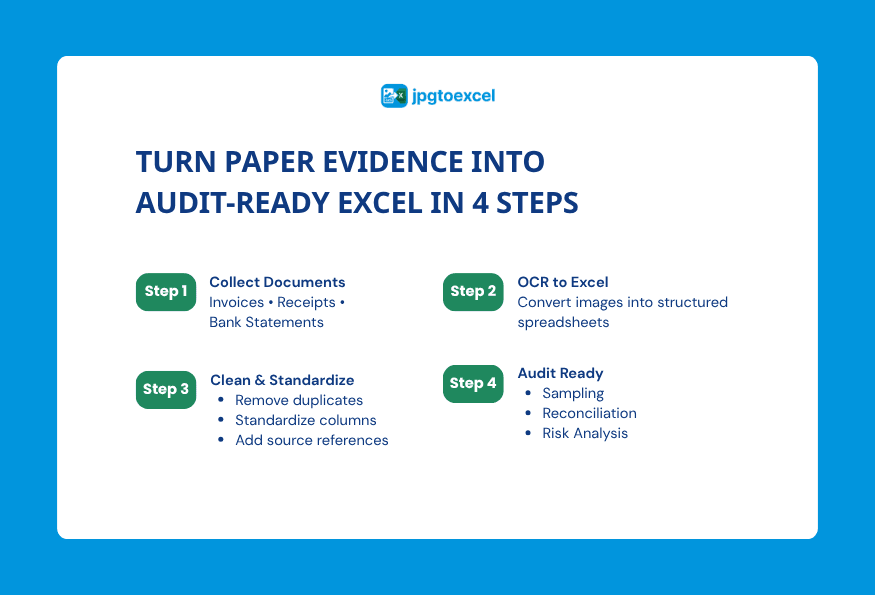
Step 1: Batch-Scan or Photograph Source Documents
Gather the invoices, receipts, or statements you need for testing and either scan them or take clear photos. Good lighting and a flat surface make a noticeable difference in extraction accuracy.
Step 2: Convert Images to Excel with OCR
Upload the batch to an OCR-based tool such as a free JPG to Excel converter and let it detect table structures automatically. Most tools of this kind can handle dozens of images in a single session, turning what would be hours of manual entry into a matter of minutes. For a full walkthrough, this step-by-step guide to converting images to Excel covers the process from upload to download.
Step 3: Structure Data for Sampling and Reconciliation
Once the data is in Excel, standardize column headers, remove duplicate or blank rows, and tag each entry with a source reference so it can be traced back to the original document if questioned later.
Step 4: Feed Clean Data Into Your Audit Platform
If your firm already uses a full audit management or analytics platform, this cleaned spreadsheet becomes the input for that next layer, whether that’s control testing, reconciliation, or anomaly detection. The digitization step doesn’t replace those tools, it just removes the manual typing that used to sit in front of them.
Choosing the Right Tool for Your Team’s Stage
Not every team is at the same point in its automation journey, and the right tool depends on where the actual bottleneck sits.
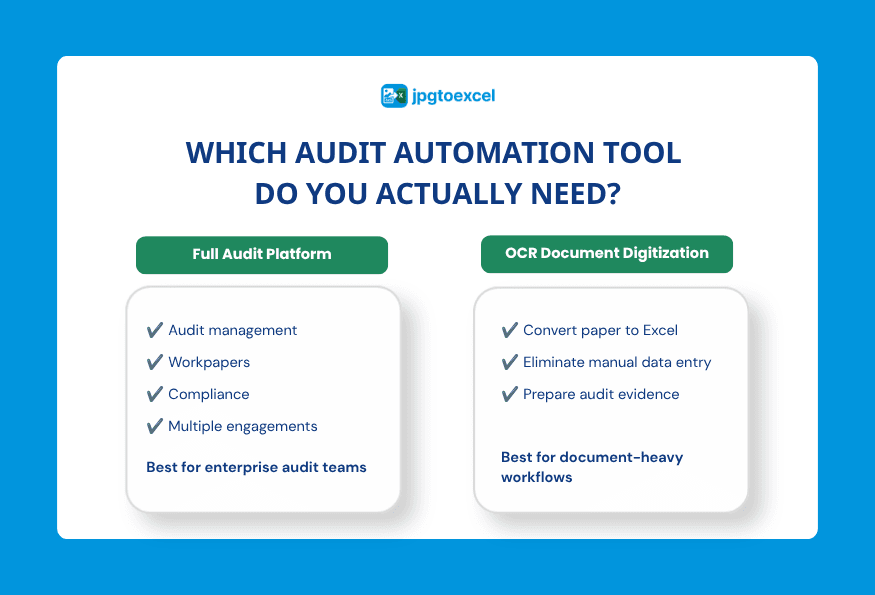
When You Need a Full Audit Management Platform
If your firm manages multiple concurrent engagements, needs centralized workpapers, evidence requests, sign-off workflows, and compliance mapping across frameworks like SOX or ISO 27001, a dedicated audit management or GRC platform is the right investment.
When You Just Need Document Digitization
If the actual daily friction is retyping numbers from paper or scanned documents into spreadsheets before any testing can start, a lightweight OCR tool solves that specific problem without the cost or learning curve of a full platform. It’s also worth comparing free vs. paid OCR software options if you’re processing evidence at higher volume regularly.
Questions to Ask Before You Buy
Before committing to any audit automation tool, it helps to ask a few direct questions: What specific manual task are we trying to remove? Does the tool need to integrate with our existing accounting or ERP systems? How much of our evidence still arrives as paper or images rather than digital files? Answering these honestly usually points to which layer of the stack actually needs solving first.
Security and Compliance Considerations
Audit evidence often includes sensitive financial and client data, so security matters regardless of which layer of the stack you’re evaluating.
Data Encryption and Retention
Look for tools that encrypt files in transit and at rest, and that clearly state how long uploaded files are retained. Tools built for one-time conversion tasks, rather than ongoing storage, often delete files immediately after processing, which reduces the surface area for a potential breach.
What “SOC 2 or GDPR Ready” Actually Means for Your Evidence
These certifications and regulations describe how a vendor handles data security and privacy, not what the software itself can analyze. A tool can be fully SOC 2 compliant and still only perform document digitization, so it’s worth checking exactly what compliance claims apply to before assuming a tool covers your entire audit process.
FAQs about Audit Automation
Is audit automation the same as audit software?
Not exactly. Audit automation is the broader concept of using technology to reduce manual audit work, while audit software refers to specific products, which can range from simple OCR converters to full GRC platforms that manage entire engagements.
Can OCR accurately read scanned invoices and receipts?
Yes, for clean, well-lit images or good-quality scans, modern OCR tools regularly achieve high accuracy on printed text and table structures. Accuracy drops with blurry photos or handwritten documents, so image quality matters more than the tool itself in most cases.
Do I need a full audit platform if I only handle a few clients?
Not necessarily. Smaller teams or solo practitioners often get more value from solving their biggest specific bottleneck, frequently data entry from paper documents, than from adopting a full platform built for large, multi-engagement firms.
How does audit automation reduce human error?
By removing manual retyping and reconciliation steps, automation eliminates the transcription mistakes that come with repetitive data entry, and it applies the same extraction or testing logic consistently across every document or transaction.
Is there a free way to start digitizing audit evidence?
Yes. Free OCR tools can convert a batch of scanned invoices, receipts, or statements into an editable Excel file without any cost or signup, which makes them a low-risk starting point before investing in a larger platform.
Final Thoughts
Successful audit automation is built on connected technologies rather than a single platform. While audit management systems, analytics tools, and AI help teams improve testing, risk assessment, and compliance, their effectiveness depends on having accurate, structured data from the start. That’s why document digitization and OCR remain foundational components of modern audit workflows, turning paper records and scanned evidence into usable digital data.
If your team still spends hours manually transferring information from invoices, receipts, or other audit documents into spreadsheets, improving that first step can deliver immediate productivity gains. A reliable JPG to Excel converter helps reduce manual data entry, create cleaner datasets for downstream audit tools, and support a more efficient audit automation workflow.