

 December 1, 2025
 11 min read
OCR API for Developers: The Complete Guide to Selection and Integration
OCR API for developers technology is the foundational bridge between the analog world of physical paperwork and the digital world of structured data. In the current era of Big Data, information is a company’s most valuable asset, yet a significant portion of it remains inaccessible, trapped within millions of scanned documents, unsearchable images, and static PDF files. For software engineers, this creates a massive challenge: how to transform these “dead” pixels into live, actionable data that a computer system can process. The answer lies in implementing a robust OCR API for developers, a tool that acts as a sophisticated digital translator, turning visual text into machine-readable formats like JSON or CSV.
In the early days of software development, extracting text was a manual and painful process that required installing heavy, resource-intensive software on local machines. These legacy methods were slow, difficult to scale, and prone to system crashes. However, the industry has shifted dramatically toward the cloud. Modern developers now rely on high-speed document parsing API solutions powered by advanced artificial intelligence. These cloud-native tools can process thousands of pages in minutes with near-perfect accuracy, allowing teams to build smarter, more responsive applications in a fraction of the time.
How OCR APIs Function: The Technical Architecture
To effectively leverage an OCR API for developers, it is essential to understand the underlying technical architecture. The journey from an image to structured data is not magic; it is a series of logical, AI-driven steps designed to ensure maximum data integrity.
1. Intelligent Image Pre-processing
The process always begins with image enhancement. An OCR API for developers must first clean up the input image to make it legible for the recognition engine. This phase includes noise reduction to remove stray digital artifacts, deskewing to straighten pages scanned at an angle, and binarization to convert colored images into high-contrast black and white. A clean image is the primary requirement for high accuracy.
2. Layout Analysis and Document Parsing
Once the image is optimized, the document parsing API moves to layout analysis. The system identifies where paragraphs end and where tables begin, separating visual elements from actual text. This segmentation is vital for understanding the semantic structure of a business document, such as an invoice where rows and columns must be perfectly preserved.
3. Character Recognition and Post-processing
During the recognition phase, the engine matches pixel patterns against millions of known fonts and symbols. Afterward, a sophisticated post-processing layer uses built-in dictionaries to correct common spelling errors and assigns a confidence score to every word found. The final result is usually delivered as a JSON payload, containing not just the text, but also “bounding boxes” (coordinates) that tell your application exactly where the text is located on the page.
Key Criteria for Evaluating the Right OCR API
Choosing an OCR API for developers is a strategic decision that impacts your application’s long-term performance. You need clear metrics to judge these tools and avoid functionality gaps.
-
Accuracy and Multi-language Support: The most critical metric is accuracy. You must test how the API handles difficult inputs like cursive handwriting or low-contrast scans. A premium document parsing API should support over 100 global languages and correctly identify specialized symbols or mathematical characters.
-
Performance and Throughput: Speed is essential for user satisfaction. Measure the latency (response time per page) and ensure the system can handle high throughput during traffic spikes. The best OCR API for developers scales automatically to meet your workload without degradation.
-
Developer Experience (DX): A tool is only useful if it is easy to implement. Look for providers that offer robust SDKs for languages like Python, Node.js, and Java. Clear documentation, sample code, and active community support are indicators of a professional-grade API.
-
Security and Compliance: Data privacy is paramount. Review the security policies of any OCR API for developers you consider. Ensure they follow laws like GDPR or HIPAA and have a transparent data retention policy (e.g., auto-deleting images after processing).
Common Industry Use Cases for Document Parsing
The versatility of an OCR API for developers allows it to serve nearly every sector of the modern economy:
-
Fintech and Banking: Automating the Know Your Customer (KYC) process by scanning passports and ID cards instantly. This allows for rapid user onboarding and reduces the chance of identity fraud.
-
Logistics and Supply Chain: An OCR API for developers can scan thousands of bills of lading and invoices, extracting the data directly into an ERP system. This eliminates the need for manual data entry and speeds up the entire shipping cycle.
-
Healthcare: Digitizing old medical records to make patient history searchable. Advanced APIs can even interpret handwritten prescriptions, improving patient safety by reducing human reading errors.
Step-by-Step Integration Guide: Adding OCR to Your Code
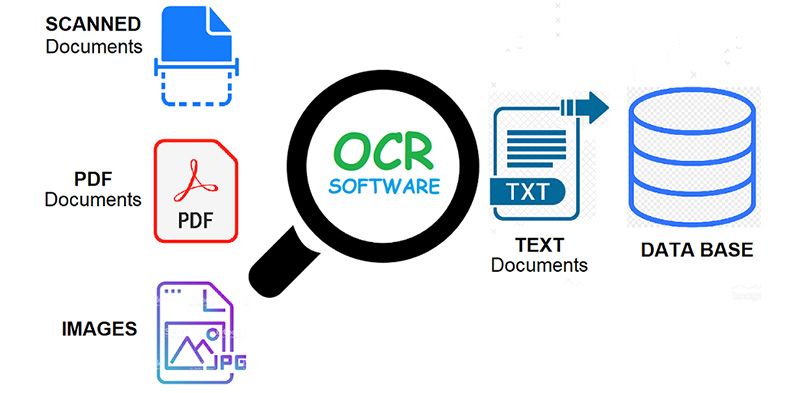
Integrating an OCR API for developers usually follows a predictable pattern regardless of your preferred programming language.
-
Step 1: Authentication: Obtain your API Key or OAuth credentials from your provider. Ensure these are kept secret and never committed to public repositories.
-
Step 2: Request Construction: Build the request payload. Most document parsing API services support base64 strings or direct image URLs. You should also set parameters like “language hints” to improve speed.
-
Step 3: Response Parsing: The API returns a structured JSON. Your code must then map these key-value pairs to your internal database fields.
-
Step 4: Error Handling: Implement robust logic to handle network timeouts, unsupported file formats, or rate limits. A reliable OCR API for developers will provide clear 4xx and 5xx error codes to assist in debugging.
Optimization Best Practices for High-Precision Data
To get the best ROI from your OCR API for developers, you must optimize the input on the client side. RESIZE images before sending them to the server to save bandwidth and reduce latency. CROPPING is another powerful technique; by focusing the API only on the relevant part of the document, you reduce noise and significantly improve character accuracy.
Furthermore, always utilize the confidence scores provided by the document parsing API. Build a “human-in-the-loop” workflow where data with a low confidence score (e.g., below 85%) is flagged for manual review. This ensures that your system maintains 100% data quality while still benefiting from the speed of automation.
The Future: OCR Meets Generative AI and LLMs
The technology behind the OCR API for developers is currently undergoing a massive revolution due to the rise of Large Language Models (LLMs). We are moving beyond simple text extraction toward “document understanding.” A standard document parsing API extracts text; an AI-enhanced system understands what that text means.
This allows for “Zero-shot” document parsing, where the system can intelligently identify fields on an invoice it has never seen before, without the need for custom training. Developers can now query their documents naturally, asking questions like “What is the total amount due including tax?” and getting a precise answer. This trend turns the OCR API for developers into a truly intelligent assistant, representing the next frontier of business automation.
Why jpgtoexcelconverter.com is The Right Solution For You?
Choosing the right partner for your data extraction needs is a critical business decision. At jpgtoexcelconverter.com, we understand the unique challenges developers face when trying to bridge the gap between images and spreadsheets. Our platform offers a high-precision OCR API for developers that is specifically optimized for table recognition and complex financial data.
We prioritize developer experience by providing a seamless document parsing API that delivers accurate results in seconds. Whether you are building a small internal tool or a massive enterprise platform, our technology scales with you. Choose jpgtoexcelconverter.com to unlock the true potential of your document data and experience the most efficient integration on the market.
Conclusion
Successfully implementing an OCR API for developers is a strategic move that enhances the value of your application and the efficiency of your users. By balancing accuracy, speed, and security, you can build a powerful data pipeline that turns physical documents into digital assets.
Take the time to thoroughly evaluate your options and test the document parsing API with your specific, real-world data. Don’t let valuable information remain trapped in static images. Start your integration journey today with a high-quality API and lead your organization into the future of automated intelligence.


