
 December 1, 2025
 11 min read
Best OCR software 2026 technology is the ultimate key to achieving a truly paperless office. In the modern business world, companies are no longer just looking for simple text recognition; they need intelligent document processing that understands the context of every invoice and receipt. Whether you are an accountant managing thousands of spreadsheets or a developer building custom apps, finding the right tool is essential for speed and accuracy.
In this guide, we will review why Best OCR Software 2026 marks a significant jump in quality compared to previous years. We will look at industry titans like ABBYY and Adobe, while also exploring new AI-driven innovators that are reshaping how we convert JPG to Excel.
Defining “Best” in 2026: The New Evaluation Standards
Selecting the best OCR software 2026 provides is no longer about picking the most famous brand. In the current market, document complexity has increased, and our expectations for data integrity have soared. To find the right tool, you must evaluate it based on three critical pillars:
1. Precision & Layout Retention
The ultimate goal of digitizing a document is to preserve its original structure. The best OCR software 2026 must be able to handle complex multi-column layouts, nested tables, and overlapping text without a single error. If your software breaks the grid during an OCR accuracy test, it creates hours of manual reformatting work in Microsoft Excel or Word, defeating the purpose of automation.
2. Intelligent Character Recognition (ICR)
Modern business documents often contain a mix of printed text, handwritten notes, and official signatures. Legacy systems frequently fail to decode cursive or messy handwriting. The best OCR software 2026 utilizes Intelligent Character Recognition (ICR), an AI-driven subset of OCR that learns from human writing styles to achieve near-perfect transcription.
3. Workflow Integration & Scalability
Your OCR tool should never exist in a silo. It needs to be the “glue” in your digital workflow. High-end tools now offer seamless connections via Zapier, Power Automate, or direct RESTful APIs. This allows your scanned data to flow instantly into your ERP, CRM, or accounting software, eliminating manual data entry entirely.
The Industry Titans: Established Overall Leaders
These are the benchmarks of the industry. When professionals discuss the best OCR software 2026, these established platforms are often the first names mentioned due to their long history of reliability and technical excellence.
ABBYY FineReader PDF: The Gold Standard
ABBYY FineReader PDF continues to dominate the high-precision market. In every OCR accuracy test we conduct, ABBYY consistently scores the highest for multilingual support and complex table reconstruction. It is specifically designed for businesses that cannot afford a single digit error in their financial or legal records. When comparing AI OCR vs Tesseract, ABBYY’s proprietary neural networks offer a level of “visual intelligence” that open-source engines simply cannot match. For those prioritizing accuracy above all else, ABBYY remains the best OCR software 2026.
Adobe Acrobat Pro DC: The Universal Ecosystem
Adobe Acrobat Pro DC remains the most popular choice for general office administration. Its strength lies in its universal compatibility and the vast PDF ecosystem Adobe has created. If your team already uses Creative Cloud or Adobe Sign, this is likely the best OCR software 2026 for your workflow. It allows you to edit scanned PDFs with the same ease as a standard Word document, making it a safe and reliable choice for most administrative tasks.
Kofax Power PDF: The Enterprise Security Powerhouse
For large corporations and legal teams, Kofax Power PDF is a formidable competitor. It distinguishes itself with enterprise-grade security and advanced redaction features. If you are handling sensitive government or medical records, Kofax is often cited as the best OCR software 2026 due to its focus on compliance and data protection. It also offers a perpetual licensing model, which many CFOs prefer over monthly subscriptions.
The AI Innovators: Intelligent Document Processing (IDP)
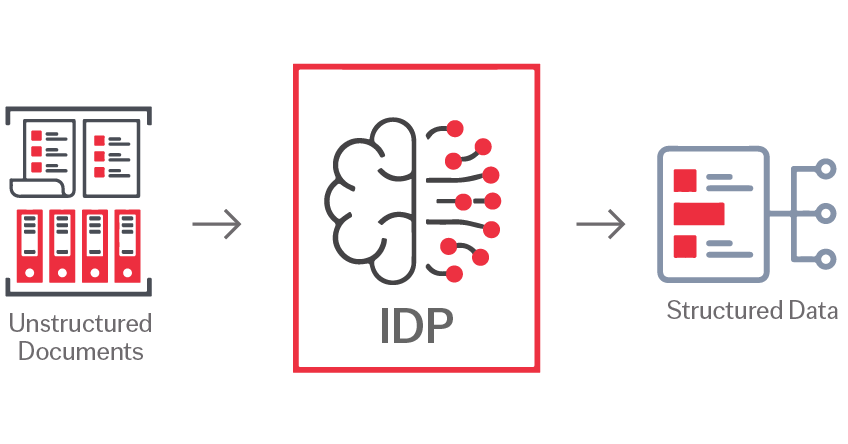
The landscape of the best OCR software 2026 is being aggressively reshaped by AI-native innovators. These tools move beyond “reading” and focus on “reasoning.”
-
Rossum (Finance & Invoices): Rossum has pioneered “cognitive data capture.” Unlike old tools that require rigid templates for every vendor, Rossum’s AI understands what an invoice is. It identifies fields like “Total Due” and “Tax ID” regardless of their position on the page. In the AI OCR vs Tesseract debate, Rossum proves that cloud-based learning is the future of automated accounts payable.
-
Google Cloud Vision & AWS Textract (Developers): For engineering teams building custom applications, these cloud APIs offer infinite scalability. They utilize the world’s largest machine learning datasets, often delivering the highest raw results in a diverse OCR accuracy test. They allow developers to bake the best OCR software 2026 features directly into their proprietary products.
-
Nanonets (Machine Learning Customization): Nanonets offers a unique middle ground. It allows non-developers to “train” the AI on their specific, non-standard business forms. If you have a unique document type that general tools struggle with, Nanonets is arguably the best OCR software 2026 for niche customization.
Emerging Trends: How Generative AI is Changing the Game
As we move through 2026, two revolutionary trends are dominating the definition of the best OCR software 2026:
-
Zero-Shot Learning: This is the ability of an AI to extract data from a document it has never seen before without any prior training. This eliminates the need for “training sets” and allows for instant deployment in new industries.
-
Chatting with Your Documents: The convergence of OCR and ChatGPT-style interfaces is here. The best OCR software 2026 allows you to “ask” your PDF a question. Instead of searching for keywords, you can ask, “Show me all invoices from last quarter that are over $5,000,” and the software will retrieve and analyze the data for you.
Why jpgtoexcelconverter.com is The Right Solution For You?
While choosing the best OCR software 2026 depends on your specific volume, most users simply need a frictionless way to move data from an image into a spreadsheet. At jpgtoexcelconverter.com, we have optimized the conversion experience for speed and accuracy.
Our platform utilizes the latest advancements in AI to ensure your OCR accuracy test results are flawless, especially when dealing with complex tables. We bridge the gap between high-end enterprise tools and ease of use, allowing you to convert JPG to Excel instantly. Whether you are a small business owner or a manager in a large firm, we provide the intelligence of the best OCR software 2026 through a simple, web-based interface.
Conclusion
The journey to find the best OCR software 2026 is ultimately about understanding your own document lifecycle. If you need 99.9% precision for legal archives, ABBYY is your leader. If you need to automate thousands of financial forms, Rossum is the innovator to watch. For those who want the power of AI without the complexity of an enterprise contract, jpgtoexcelconverter.com offers the perfect balance.
The era of manual data entry is over. Do not settle for outdated scanning methods. Embrace the best OCR software 2026 and unlock the hidden data currently trapped in your paper files. Start a free trial with your top choice today and run your own OCR accuracy test to experience the digital revolution firsthand.


