
 March 17, 2026
 11 min read
Purchase Order JPG to Excel conversion is a critical operational task for modern procurement teams looking to eliminate the inherent inefficiency of manual data entry. In today’s digital landscape, a significant portion of business transactions still originates from image-based files. Procurement departments frequently receive purchase orders as JPG or PNG images via email attachments. While these files look clear to the human eye, the data trapped within them is functionally “invisible” to computer systems. You cannot easily search, edit, or perform mathematical calculations on a static picture. This creates a massive bottleneck for organizations trying to scale their supply chain operations.
Manual data entry from these images acts as a silent killer of efficiency, wasting thousands of productive hours every year. Relying on staff to manually transcribe numbers often leads to costly human mistakes, such as incorrect quantities or misspelled vendor names. Over time, these small errors accumulate into high labor costs and financial discrepancies. A reliable PO image converter is the definitive solution to these problems. It turns static pictures into structured, digital data that you can actually use for analysis. By implementing a Purchase Order JPG to Excel workflow, you transform raw images into actionable insights that drive business growth.
Understanding the Role of Purchase Orders in Modern Procurement

A Purchase Order (PO) is much more than just a request for goods; it is a formal legal contract sent from a buyer to a seller. This document ensures that both parties are in total agreement regarding the price, quantity, and delivery terms of the transaction. For finance departments, the PO is vital for maintaining compliance with auditing rules and international accounting standards.
To successfully implement a Purchase Order JPG to Excel process, it is essential to understand the different data layers within the document:
-
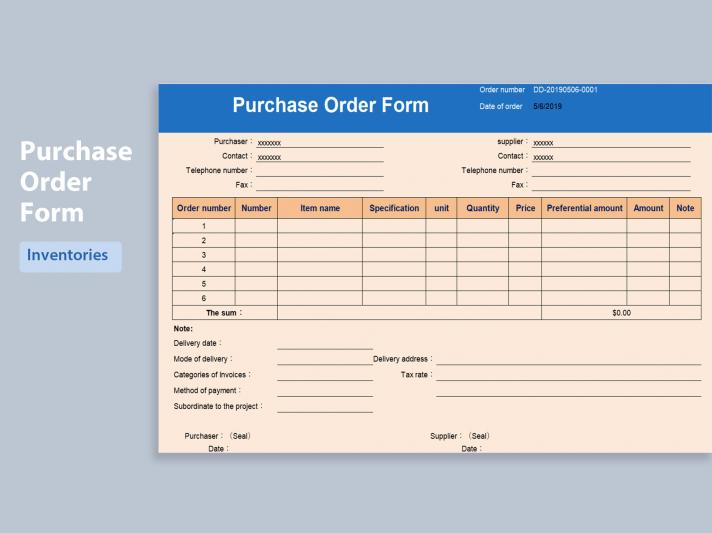
Header Information: This section contains the unique PO number, vendor contact details, and the order date. These are the primary identifiers used for tracking and filing.
-
Line Items: This is the technical core of the procurement document. It lists the SKU, product description, and quantity. A high-quality PO image converter must capture these rows with 99.9% accuracy to ensure inventory levels are correct.
-
Financial Footer: This contains the final financial summary, including taxes, shipping fees, and total amount due.
Structured data in Excel is vital for performing a “three-way match” later in the cycle, where you compare the original order with the incoming invoice and the received goods note. This is why a Purchase Order JPG to Excel strategy is the foundation of a modern, data-driven procurement office.
How Technology Bridges the Gap: From Pixels to Spreadsheets
Modern technology utilizes Optical Character Recognition (OCR) to bridge the gap between physical paper and digital databases. When you use a Purchase Order JPG to Excel tool, the OCR engine identifies the geometric shapes of letters and numbers within the image. It then converts those shapes into machine-readable digital text.
However, basic OCR is no longer sufficient for complex financial documents. Leading-edge solutions now use AI-powered data extraction. AI understands the semantic context of the words on the page. For example, it can intelligently distinguish a “Bill To” address from a “Ship To” address based on its position and surrounding keywords. This means a professional PO image converter doesn’t just “see” words; it understands their business meaning. Machine learning further improves this process by learning different document layouts used by global vendors, ensuring that your Purchase Order JPG to Excel results get better every day.
Step-by-Step Guide: Converting Purchase Order JPG to Excel
Ready to automate your workflow? Follow this professional sequence to move from image to data with total confidence:
-
Step 1: Document Preparation: Ensure the JPG file is clear and high-resolution. Avoid blurry photos or dark shadows, as these are the primary causes of extraction errors.
-
Step 2: Selecting the Right PO Image Converter: Choose a platform like jpgtoexcelconverter.com that is specifically optimized for table recognition and financial data.
-
Step 3: Upload and AI Analysis: Drag your files into the system. The software will perform a deep scan, mapping every pixel to a specific Excel cell in seconds.
-
Step 4: Validation and Review: Most professional tools provide a side-by-side view. You should quickly review the data to fix any minor typos, ensuring 100% data integrity before final storage.
-
Step 5: Export and Integration: Save your finished file as an .XLSX or .CSV. You can now import this structured data directly into your ERP systems like SAP, Oracle, or Microsoft Dynamics.
Comparing Methods: Manual Entry vs. AI-Powered Conversion
When we compare the two common methods of data handling, the advantages of automation in the Purchase Order JPG to Excel debate are undeniable. Manual entry is notoriously slow, often taking 5 to 10 minutes per page. In contrast, an automated tool is almost instantaneous, processing an entire document in less than five seconds.
Accuracy is the second major differentiator. Human workers, especially during long shifts, have a high risk of making transposition errors. An AI-powered PO image converter provides a level of precision that humans simply cannot match. From a financial perspective, the cost of labor for manual typing is much higher than a software subscription. Choosing to Purchase Order JPG to Excel through automation is a strategic move that turns a slow administrative chore into a high-speed digital highway.
Integrating Structured Data into the Procurement Lifecycle
The value of a Purchase Order JPG to Excel workflow extends far beyond just “making a list.” Once the data is in a structured spreadsheet format, it unlocks several strategic benefits:
-
Three-Way Matching: Speed up the reconciliation of POs, invoices, and receipts to prevent overpayment for items not received.
-
Spend Analysis: Aggregate all your orders to see where the company’s money is going. You can use this data to negotiate deeper discounts with high-volume vendors.
-
Audit Readiness: Auditors love organized digital records. Maintaining a digital trail through a PO image converter ensures that your company is always prepared for financial reviews.
Why jpgtoexcelconverter.com is The Right Solution For You?
At jpgtoexcelconverter.com, we specialize in the high-stakes world of procurement data extraction. We understand that your business relies on accuracy and speed. Our platform is engineered to handle the toughest Purchase Order JPG to Excel tasks by providing an enterprise-grade OCR engine that respects your table structures.
We provide a frictionless experience, allowing you to upload thousands of orders at once using batch processing. We prioritize your data security by using high-level encryption and strictly following global privacy laws like GDPR. When you choose our PO image converter, you are not just getting a tool; you are gaining a partner that helps your team focus on strategy rather than typing. Trust jpgtoexcelconverter.com to transform your messy images into professional business intelligence today.
Conclusion: Empower Your Team with Digital Clarity
The future of procurement is paperless, automated, and “zero-entry.” By embracing the power to convert Purchase Order JPG to Excel, you are future-proofing your business. Every manual step you remove from your office is a reduction in risk and an increase in profitability.
Don’t let manual typing hold your procurement team back. Start your digital transformation journey today by picking a professional PO image converter. You will be amazed at the time and energy you reclaim for high-level strategy. Every Purchase Order JPG to Excel conversion is a step toward a more organized, efficient, and successful business. The digital era is waiting for you—take the lead with jpgtoexcelconverter.com now.


